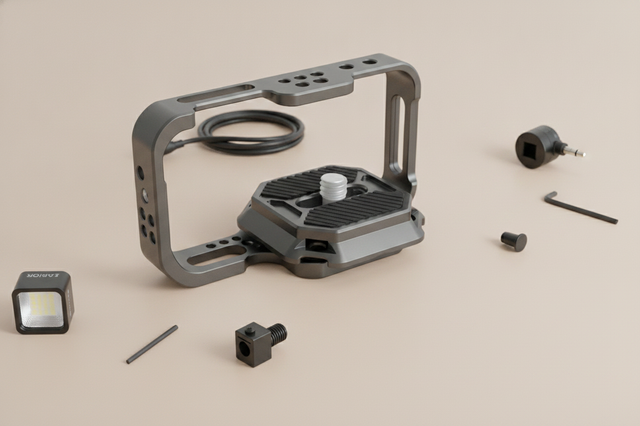
A phone cage for vertical video makes sense when you need more control, more mounting points, or a better handheld feel than a bare phone or simple grip can give you. It is not about building the biggest rig. The best setup stays compact enough for Reels, Shorts, and TikTok-style work while keeping access and workflow speed intact.
When a Phone Cage Helps Vertical Creators
Vertical creators run into the same problem fast: the phone is easy to carry, but it can feel awkward once you start adding a mic, light, grip, or cable. TikTok's vertical video best practices also make the framing issue clear, because important parts of the shot can get crowded by app UI if you do not stay intentional.
That is where a phone cage for vertical video starts to make sense. It gives you a more deliberate way to mount accessories, hold the phone, and keep the build organized. For solo creators, that can reduce the stop-start feel that comes from constantly reworking a loose setup. The trade-off is simple: more structure usually means more bulk.
If you mainly shoot quick clips with very few add-ons, a smaller setup may be the better fit. If you regularly switch between talking-head clips, product shots, and handheld movement, a cage is easier to justify. For readers who want a broader path into modular rigs, full phone cages are the next decision to compare.

Fit and Compatibility Checks
Before you buy a phone cage for vertical video, check the fit around the phone itself, not just the product listing. A cage can look compatible on paper and still feel annoying in use if it blocks buttons, crowds the ports, or makes the phone harder to insert and remove during fast shoots.
Start with the physical fit. The phone should sit securely without forcing the frame open or making the grip feel cramped. Then check whether the cage still feels usable in portrait orientation, because that is where awkward clearance problems tend to show up. If you use a case, give it extra attention, since case thickness can change the fit even when the phone technically mounts.
The same caution applies to magnetic workflows. MagSafe-style mounting can be convenient, but the whole setup still needs a real-world check for alignment and interference. As a rule of thumb, verify the exact combination you plan to film with, especially if you swap cases or keep add-ons attached between shoots. If you want a category-level place to browse, camera cages are the safer destination than guessing from a product name alone.

For creators comparing options, the most useful question is not "Does it fit?" but "Does it stay usable once I add the rest of the rig?" That is the difference between a cage that looks right and one you will actually keep using.
Vertical Handling and Balance
A vertical rig can feel awkward when the weight pulls away from your hand or pushes the wrist into a bad angle. Mayo Clinic's repetitive strain injury prevention guidance notes that awkward, repeated positions can contribute to strain, which is why neutral grip and simpler handling matter during longer shooting sessions.
In practice, balance is mostly about where the phone and accessories sit relative to your hand. A side-heavy or top-heavy build may still be secure, but it can feel tiring faster and make one-handed repositioning less pleasant. That matters most when you are doing quick pans, talking-head takes, or repeated starts and stops.
The useful test is simple: hold the rig in portrait orientation, then try to move it the way you would during a real shoot. If the setup makes you fight the wrist or keeps drifting out of position, it is probably too busy for the workflow. For a deeper look at that trade-off, side-heavy rigs are worth reviewing before you add more gear.
A compact grip-based setup can be easier to live with when speed matters. A fuller rig can feel more controlled when you are working with more accessories, but it also demands more attention to balance. If you want a practical handheld option to compare against a cage build, the MagSafe grip is a useful way to think about the lighter end of the spectrum.
For most creators, the right choice is the one that feels stable enough without forcing constant micro-adjustments. If you have to keep regripping the phone, the rig is probably too cumbersome for social content speed.
Accessory Mounting Without Clutter
A cage should earn its keep by making the workflow easier, not by collecting attachments. For vertical social content, the accessories that usually matter most are the ones that improve audio, lighting, or control. Everything else has to prove that it saves time or solves a real friction point.
- Audio: Add a mic only if it removes a repeat problem, like poor room sound or a need for clearer voice capture during talking-head clips.
- Lighting: Add a small light when the room is inconsistent enough that it keeps hurting exposure or subject visibility.
- Control: Add a grip or shutter control if the rig is awkward to start, stop, or reposition with one hand.
- Fast setup changes: Favor accessories that let you swap scenes quickly, because overbuilt rigs can slow down short-form production.
The main mistake is assuming more mounting points automatically mean a better rig. In reality, extra hardware can block buttons, tangle cable routing, and make each setup change take longer. If you are building a cleaner workflow, mobile photo and video accessories are a better way to think about the category than adding gear just because the cage allows it.
If you want a more stable base for a phone-mounted workflow, the ST-14 phone mount is a simple example of a setup where the mount itself becomes part of the workflow decision, not just a holder.
Which Setup Fits Your Workflow?
Use this as a quick chooser for typical vertical creator setups.
| Scenario | Best For | Main Trade-Off |
|---|---|---|
| Simple phone rig | Fast clips and minimal setup time | Limited mounting flexibility |
| Phone cage with a few mounts | Balanced creator workflows | Adds some bulk |
| Heavier cage build | Multiple accessories and more structure | Slower setup changes |
| Minimal handheld setup | Speed and low friction | Fewer control options |
A simple phone rig is usually the easiest path when speed matters more than accessories. A phone cage with a few mounts is often the best middle ground for creators who need a mic, light, or grip without overbuilding the setup. A heavier cage build makes more sense when you really need mounting flexibility, but it becomes less attractive when fast setup changes matter more than gear capacity.
You can also think of it this way: if your content changes quickly, start simple. If your content repeats enough that standardizing the build saves time, a more complete cage setup may be worth the extra bulk. Ulanzi's mobile filmmaking solutions fit that workflow-based choice better than a spec-first shopping approach. If you are still deciding between a modular build and a simpler carry-friendly option, quick release kits can help speed up swaps without committing to a heavier rig.
Build and Check Your Vertical Rig
Before the first shoot, run a quick check in the same order every time. Fit the phone, confirm button and port access, tighten the mount, place accessories where they do not block movement, and hold the rig in portrait orientation for a few seconds to see whether it feels natural.
Then do a short practice clip. If the rig is hard to start, hard to grip, or awkward to adjust mid-shot, that is the setup telling you something useful. A phone cage for vertical video should make the workflow faster to repeat, not harder to manage.
If the rig passes those checks, you have a usable build. If it does not, simplify before adding more hardware. That is the easiest way to protect your device, keep the setup compact, and avoid the kind of friction that makes creators stop using the cage.
For a compact support option that can fit into a lighter vertical setup, the MT-33 tripod is a practical place to start.
FAQs
What Makes a Phone Cage Better for Vertical Video?
A phone cage can give you more mounting options, a cleaner way to build out a vertical rig, and better day-to-day handling than a bare phone in some workflows. It is most useful when you need to attach accessories and keep the setup organized without constantly rebuilding it.
How Do I Know If a Phone Cage Will Fit My Phone?
Check clamp clearance, button access, port access, and whether your case changes the fit. The real test is whether the phone still feels easy to insert, remove, and operate once it is mounted in portrait orientation.
Can I Use a Phone Cage With a Case or MagSafe Accessory?
Sometimes, yes, but only if the full setup still fits cleanly. Case thickness, magnetic alignment, and accessory shape can all change how the cage sits in the hand, so verify the exact combination before a real shoot.
How Should I Balance a Vertical Rig for Handheld Shoots?
Keep the rig compact, place accessories thoughtfully, and test it in portrait orientation before filming. If the build pulls your wrist into an awkward position or makes one-handed repositioning difficult, simplify the layout.
What Is the Best Setup for Fast Reels or TikTok Shoots?
Choose the simplest setup that still gives you enough control and accessory support for the shoot. When speed matters, a lighter rig often works better than a fully built cage that slows down setup changes.
Final Takeaway
Start with the simplest rig that still handles your camera, grip, and accessory needs. If a phone cage adds control without slowing your workflow, it is probably the right move; if it creates clutter or delay, stay lighter.