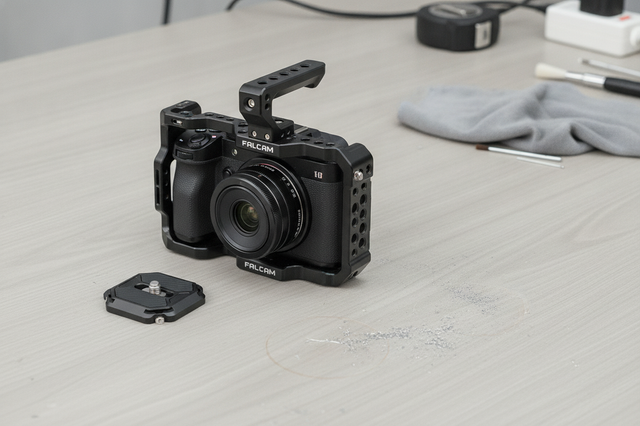
Adding quick-release plates to phone and camera cages is worth it when you keep moving the same rig between mounts and want fewer rebuilds. The upside is speed, but only if the cage, plate, and release path match cleanly. For anyone considering a quick release upgrade, the first question is fit, not convenience.

Why Add Quick-Release to an Existing Cage
For most creators, the pain point is not stability on its own. It is the time lost rebuilding the rig every time you move from handheld to tripod, desk, or another support. A quick-release plate can make those swaps faster and reduce the number of times you directly thread accessories into the cage or camera body.
That said, adding quick release does not automatically improve the rig. It only helps when the interface is matched and the plate seats cleanly. If you are mainly changing mounts once in a while, the extra hardware may not be worth the added setup step. If you change mounts often on shoot day, it usually is.
A good rule of thumb is simple: if the setup feels stable enough already, quick release should be a convenience upgrade, not a rescue plan. If you still need to force alignment, the real problem is fit, not speed.
If you want a broader walkthrough of the workflow, the short guide on adding quick-release to a cage setup is a useful follow-up.
Check Cage Compatibility Before You Buy
Compatibility is the hard gate. Before you think about speed, check how the cage actually accepts a plate, where the mounting point sits, and whether nearby accessories leave enough room for the release action.
Phone cages often expose multiple 1/4"-20 thread points and cold-shoe mounts, which makes them adaptable, but not universally compatible with every plate style. A phone rig can look ready for a quick-release upgrade and still fail the fit check if the plate does not sit flat or the lock path is crowded. The RØDE phone cage guide is a helpful baseline for spotting the kinds of mounting points many phone cages provide.
Mixed-brand systems deserve extra caution. In one compatibility discussion, users noted that Falcam F22-style parts can differ slightly from standard NATO dimensions, so visual similarity alone is not enough to confirm fit. That is the kind of mismatch that can turn a quick install into a loose or awkward one, especially if you assume one clamp style will solve every cage setup. For that reason, the article on non-native plate risks is worth reading before you buy across ecosystems.
Use this quick check before ordering:
| Check | What You Want | What Should Stop You |
|---|---|---|
| Mounting interface | A known thread, base, or adapter path | Guessing from appearance alone |
| Plate seating | Flat contact without force | Rocking, twisting, or a gap |
| Clearance | Room for levers, cables, and handles | A blocked release or port |
| Stability | Firm hold with normal handling | Dependence on over-tightening |
| Workflow fit | Faster swaps you will actually use | Extra hardware that slows you down |
If the plate does not seat flat, rocks under light hand pressure, or only feels secure when you crank it down, treat that as a no-go and find a better match. That is especially important in a quick release camera cage upgrade, where a near-fit can be more frustrating than no upgrade at all.
Choose the Right Quick-Release Path
The right path depends on the kind of swap you make most often. If you mainly move one rig between tripod and handheld use, a compact plate path may be enough. If you are trying to bridge a phone cage and a camera cage workflow, the interface match matters more than the label on the box.
Here is a practical way to think about it:
| Path | Best For | Fit Caution | Workflow Trade-Off |
|---|---|---|---|
| Simple plate and base | Basic swap speed on one rig | Must still match the cage mounting point | Easy to understand, limited flexibility |
| Ecosystem-specific quick release | Users already committed to one family | Check compatibility carefully before mixing parts | Faster if the whole path stays native |
| Multi-accessory mounting route | Rigs with mic, monitor, or handle clutter | Clearance becomes the main risk | Flexible, but can feel busier on compact cages |
If you want a store-side starting point, browse the Falcam range when you are already leaning toward that ecosystem, or compare broader quick-release systems if you are still deciding how your rig should move. For users who need a general mounting path rather than a single dedicated ecosystem, the mounting accessories collection is a safer browsing step than guessing at one exact part.
Two product pages are especially relevant as navigation points if your cage fit is already established: Falcam F38 Quick Release Top Plate 2269 and Falcam F38 Quick Release Top Plate V2 2401A. Treat them as options to check against your cage specs, not as universal answers.
For readers comparing ecosystems, the Claw quick-release options collection is another useful place to look before committing to a single path.

Install the Plate on a Phone or Camera Cage
Start with a dry fit. Before you tighten anything, place the plate where it needs to sit and confirm the alignment looks natural. If it does not line up without force, stop there and revisit compatibility.
- Set the cage on a stable surface and clear nearby accessories.
- Place the plate in position without fully tightening it.
- Confirm that the plate sits flat and does not lean or twist.
- Tighten gradually and keep the pressure even.
- Recheck the release action after the plate is secured.
- Attach the accessories you will actually use and repeat the check.
The reason for this order is simple: anti-twist features and high-friction contact only help if the plate is already seated correctly. A quick-release install can feel fine on an empty cage, then behave differently once a monitor, mic, or cable adds weight and leverage. That is why a real-load check matters more than a bench-only check.
If the plate binds, shifts, or seems to need extra force to stay put, do not treat that as normal. Re-open the fit, check the orientation, and make sure no nearby accessory is stealing clearance. A quick-release camera cage upgrade should reduce friction in your workflow, not create a new problem every time you swap mounts.
Test Swaps and Lock-In Behavior
After installation, cycle the release a few times and watch for consistency. The plate should seat the same way each time, and the latch should feel predictable rather than sticky or vague.
Next, test the rig the way you will actually use it. Lift it with the planned accessories attached, make a gentle shake or angle change, and look for rocking or rotation. That matters because a setup that seems fine when empty can loosen once the real load is on it.
Then check for interference. Cables, handles, battery access, buttons, and screens should still be reachable after the plate is in place. If the release lever or lock is awkward to reach, the swap may be technically installed but still annoying in real use.
The practical go/no-go standard is easy to remember: if it seats cleanly, stays put under normal handling, and does not block the rest of the rig, it is ready. If any of those fail, rework the fit before you rely on it in the field. The post-install checklist in rigging safety and interference checks is a useful reference point for that kind of validation.
If you want a deeper look at wear and lock feel over time, surface wear and friction can help explain why a plate that once felt crisp may change after repeated use.
For readers who want a clearer sense of accidental-release behavior, safety-lock behavior is a good follow-up on why the lock matters most when the rig is moving.
Build a Safer Swap Checklist for Shoot Day
Before a real shoot, confirm four things: the plate seats flat, the lock action is repeatable, the rig stays steady with your actual accessories, and nothing blocks the ports or controls you need. Recheck the setup after transport or any accessory change. If parts feel worn, loose, or mismatched, fix that first. Once the fit is clean, then expand the system.
FAQs
How Do I Know If My Cage Can Take a Quick-Release Plate?
Check the cage's actual mounting interface, not just the visible openings. You want a plate that can sit flat without forcing the threads or blocking nearby gear. If the mount path is unclear, treat that as a sign to verify the cage specs before buying.
What Is the Safest Order for Installing a Quick-Release Plate?
Dry-fit first, align the plate, tighten gradually, and test the release before adding accessories. After that, install your real field setup and check for wobble, blocked controls, or any need to over-tighten. That order catches most fit mistakes early.
Can I Use One Quick-Release System for Both a Phone Cage and a Camera Cage?
Sometimes, but only if the interface, plate path, and accessory clearance all match. A mixed workflow can work well when the whole chain is designed for it. If any part is a near-match, a separate adapter or different plate path may be the better call.
Why Does My Quick-Release Setup Still Feel Loose After Installation?
Loose feel usually means the plate is not seating evenly, the interface is not the right match, or another accessory is interfering with the lock. Recheck it with the actual load attached, because an empty cage can hide problems that show up once the rig is built out.
When Is a Quick-Release Upgrade Worth It for Smartphone Rigging?
It is most useful when the same rig keeps moving between handheld, tripod, and other mounts. If your setup rarely changes, the added parts may not save much time. The upgrade makes the most sense when repeated swaps are part of your normal workflow.