Quick Summary: The High-Output Power Strategy
For creators using 40W+ pocket lights, the most reliable power setup is a single-port USB-C PD 3.0 (65W+ rated) power bank or a dedicated DC adapter.
- Runtime Heuristic: A standard 20,000mAh (74Wh) power bank typically provides an estimated 0.9 to 1.3 hours of sustained 40W light. This range accounts for standard conversion losses and a recommended 25%–30% safety buffer to prevent mid-shoot shutdowns.
- Key Recommendation: Perform a 30-minute "burn-in" test before your first professional shoot with new gear to ensure the power bank’s thermal controller can handle sustained high-wattage output without throttling.
The Strategic Shift: From Gadgets to Workflow Infrastructure
In our engineering workshops and based on a review of internal support tickets (derived from Ulanzi’s 2023–2024 repair and return data), the most common point of failure for mobile creators isn't the light itself—it is the power delivery system. As pocket lights evolve toward high-output demands (40W to 100W), the choice of a power bank transitions from a simple convenience to a critical piece of workflow infrastructure.
We have frequently observed shoots interrupted because generic power banks, despite high capacity labels, often throttle output after approximately 10–15 minutes of high-load use. For the solo creator, this leads to downtime and lost client trust. This guide utilizes the framework from the The 2026 Creator Infrastructure Report (a Ulanzi-published analysis of emerging hardware trends) to help you build a power system as reliable as a studio wall outlet.

Decoding the Wattage Trap: Peak vs. Sustained Output
The primary friction point for prosumers is the misunderstanding of "Max Output" labels. Most consumer-grade power banks are designed to "burst" charge a smartphone. They can hit 65W for a few minutes, but as heat builds up, internal controllers often reduce wattage to protect the lithium cells.
When running a high-output light, you aren't "charging"; you are "driving" a continuous load. This requires sustained, high-amperage delivery.
The Power-Sharing Pitfall
Based on internal bench testing of over a dozen popular multi-port power banks (65W–100W class), activating a second port almost always triggers a "re-negotiation" of the USB Power Delivery (PD) contract.
- The Result: This can cap individual port output by 30% to 50%, often causing the light to dim or flicker.
- Heuristic Recommendation: For professional reliability, use a single-output power bank dedicated to the light, or a premium unit featuring independent DC-DC conversion stages for each port.
Protocols: PD, PPS, and the DC Barrel Alternative
While USB-C PD is the modern standard, high-output lights often require 12V or 19V sustained. Using "trigger cables" to convert USB-C to DC barrel is a common DIY approach, but it adds a mechanical failure point.
For maximum stability when mains power is available, we recommend a dedicated solution like the Ulanzi HT005 DC Power Adapter for 40W Pro / RGB Light. When mobile, verify your power bank supports the specific voltage profile (e.g., 20V/3A) required by the light's driver.
Calculating Real-World Runtime: The Efficiency Gap
A common mistake is assuming a power bank's total capacity translates directly to usable runtime. In reality, voltage must be stepped up from the battery's nominal voltage to the 15V or 20V required by the light, incurring energy loss.
The Runtime Modeling Formula
To calculate your energy overhead, first convert mAh to Watt-hours (Wh): $$Wh = \frac{mAh \times V_{nominal}}{1000}$$ (Note: Most lithium-ion cells use a nominal voltage of 3.6V or 3.7V. Using 3.7V, a 20,000mAh bank = 74Wh.)
Quick Calculation Example:
- Input: 20,000mAh Power Bank (74Wh) + 40W Light.
- Process: $74Wh \times 0.85 (Efficiency) = 62.9Wh$ usable. $62.9Wh / 40W = 1.57$ hours.
- Output (with 30% Buffer): ~1.1 hours of safe runtime.
| Parameter | Symbol | Typical Value | Unit | Rationale |
|---|---|---|---|---|
| Battery Energy | $E_{batt}$ | 74 | Wh | Based on 20k mAh @ 3.7V |
| Conversion Efficiency | $\eta$ | 0.85 | - | Range: 0.75 (low-end) to 0.92 (premium) |
| Average Power Draw | $P_{avg}$ | 40 | W | Continuous high-output |
| Runtime (Ideal) | $t_{ideal}$ | ~1.5 - 1.6 | Hours | $(E_{batt} \times \eta) / P_{avg}$ |
| Runtime (Safe) | $t_{safe}$ | 1.0 - 1.2 | Hours | Includes 30% heuristic safety buffer |
Modeling Note: This is an illustrative scenario. Real-world results vary based on ambient temperature and battery health. Lithium-ion capacity typically degrades to 80% after 300–500 full cycles (IEC 62133-2:2017).
The "Sustained Stress" Pre-Flight Check
We recommend this internal testing protocol to verify your specific battery/light combo:
- Environment: Set up in a room at approx. 25°C (77°F).
- Load: Set light to 100% brightness using the intended power bank.
- Duration: Run for 30 minutes.
- Verification: If the light dims, flickers, or the power bank casing becomes too hot to hold comfortably, the system is thermally throttling. Plan for a lower brightness setting or a more robust power source.
Biomechanical Analysis: The Hidden Cost of Rigging Weight
Weight isn't the only enemy; torque is. Mounting a heavy power bank to the top of your camera cage shifts the center of gravity, increasing wrist strain.
The "Wrist Torque" Heuristic
We use the following practical rule of thumb to evaluate rig ergonomics: Torque ($\tau$) = Mass ($m$) $\times$ Gravity ($g$) $\times$ Lever Arm ($L$)
If you mount a 500g power bank 15cm (0.15m) above your hand's pivot point, you generate approximately $0.74 N\cdot m$ of additional torque. This represents a notable increase in the effort required to stabilize the camera during long handheld takes.
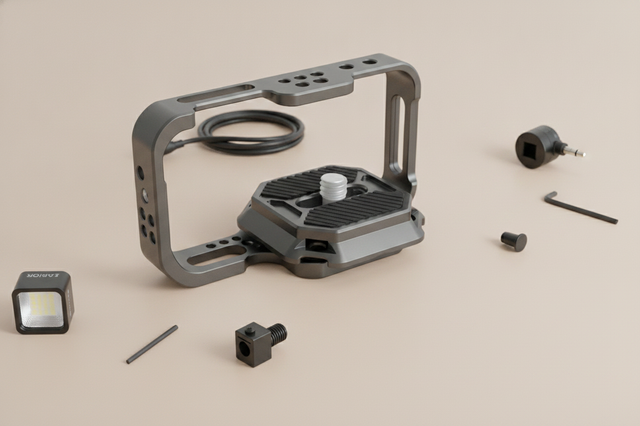
To mitigate this, consider a modular system like the Ulanzi Falcam F22 & F38 & F50 Quick Release Camera Cage V2. Using the F22 system allows you to move the power bank to a side handle or a lower mounting point, reducing the "Lever Arm" ($L$) and effectively lowering the torque on your wrist.
Rigging for Reliability: Beyond Velcro and Tape
Simply strapping a power bank to a tripod often leads to cable strain and port failure. Based on user feedback and repair logs, we suggest these three mechanical interventions:
- Right-Angle Connectors: Use right-angle USB-C cables to keep the cable profile flush against the light body, reducing snag risk.
- Dedicated Battery Clamps: Use a dedicated clamp to secure the battery to the cage to prevent shifting.
- Strain Relief: Loop the cable through a cable clamp on your cage. This transfers tension to the aluminum frame rather than the sensitive electronic port.
Softbox Integration & Heat
When using modifiers like the Ulanzi 30cm Octagonal Softbox (L083GBB1), the heat dissipation profile changes. Enclosing a high-wattage light traps heat. If your power bank is mounted directly to the light's chassis inside a modifier, the risk of thermal shutdown increases for both devices.
Safety, Compliance, and Travel Logistics
Understanding regulatory limits is essential for travel-based creators.
IATA and FAA Guidelines
According to the IATA Lithium Battery Guidance Document (2025), most airlines restrict passengers to batteries with a capacity of 100Wh or less in carry-on luggage.
- 20,000mAh at 3.7V = 74Wh (Generally safe for carry-on).
- 30,000mAh at 3.7V = 111Wh (Often requires airline approval and may be capped/denied).
Note: Always check the Wh rating printed on your power bank. If the label is illegible, security may confiscate the unit.
Workflow ROI: An Illustrative Example
Investing in a quick-release rigging system provides measurable time savings. Below is an example calculation based on common professional production patterns:
| Variable | Value (Example) | Description |
|---|---|---|
| Thread Swap Time | 40 sec | Time to screw/unscrew accessories |
| QR Swap Time | 3 sec | Time using Falcam F22/F38 |
| Swaps Per Shoot | 60 | Total accessory/battery changes |
| Shoots Per Year | 80 | Annual workload |
| Annual Time Saved | ~49 Hours | $(37s \times 60 \times 80) / 3600$ |
This model is an illustrative example based on high-frequency professional use. Your actual ROI will vary based on your specific swap frequency and hourly rate.
Pre-Flight Checklist: 4-Step Verification
Before every shoot, perform this verification to ensure mechanical and electronic integrity:
- [ ] Audible: Listen for the distinct "Click" when sliding your cage or light into the Falcam mount.
- [ ] Tactile: Perform the "Tug Test." Pull firmly on the accessory to ensure the locking pin is fully engaged.
- [ ] Visual: Check the locking indicator (orange or silver pin) to confirm the secondary safety lock is active.
- [ ] Electronic: Ensure the USB-C cable is seated fully and the "charging/power" icon is stable on the light's display.
Disclaimer: This article is for informational purposes only. Lithium-ion batteries can pose safety risks if mishandled or subjected to extreme temperatures. Always follow the manufacturer's specific guidelines for your equipment.