The Infrastructure of Shadow-Free Desktop Production
In the world of top-down product photography and desktop tutorials, shadows are often the primary barrier to professional quality. A harsh shadow cast across a product's texture or a dark silhouette obscuring a diagram can shift the viewer's perception from "expert" to "hobbyist." While many creators attempt to solve this by increasing brightness, the issue is typically not the volume of light, but the geometry of its placement.
Based on common patterns observed in community feedback and setup reviews, the most frequent error is mounting lights directly to the desk or using short, vertical stands. This creates a steep angle that results in long, distracting shadows. Professional desktop lighting requires a shift toward "architecting the light field." This guide establishes practical geometric standards for a modular, shadow-free workflow using desk-clamped infrastructure and articulated mounting systems.
The Geometry of Softness: The 2:1 Placement Heuristic
Standard task lighting advice often suggests placing a lamp 40–60cm (16–24 inches) above the desk. However, for shadow elimination in macro or top-down work, this distance may be counterproductive. According to the Inverse Square Law, light intensity drops to 1/4 of its value when the distance is doubled.
In our workshop tests, we have found that placing lights closer—typically within a 10cm to 20cm (4 to 8 inch) range from the subject—provides softer, more controllable light. This proximity allows the light source to act as a larger relative "wrap" around the subject.
The Horizontal-to-Vertical Ratio
Rather than focusing on fixed angles, we recommend a placement heuristic based on the subject's height. For a subject approximately 30cm tall, aim for this "rule of thumb" configuration:
- Vertical Height: The light source center should be roughly 15–20cm above the subject plane.
- Horizontal Offset: The light should be 30–45cm laterally away from the subject.
This 2:1 or 3:2 horizontal-to-vertical ratio ensures the light hits the subject at a shallow enough angle to fill in micro-shadows while remaining far enough to avoid appearing in the camera's top-down field of view.
Quick-Reference: Shadow-Free Setup Cheat Sheet
| Feature | Recommended Specification | Purpose |
|---|---|---|
| Placement Ratio | 2:1 (Horizontal : Vertical) | Maximizes "wrap" and fills micro-shadows. |
| Light Distance | 10–20cm from subject | Increases relative light source size for softness. |
| Mounting Standard | ISO 1222:2010 (1/4"-20 or 3/8"-16) | Ensures universal compatibility and safety. |
| Safety Check | The "Tug Test" | Verifies mechanical engagement of QR plates. |
| Cable Management | Strain Relief Clamps | Prevents port damage and "rig sag." |
Building the Central Mast: Stability and Standards
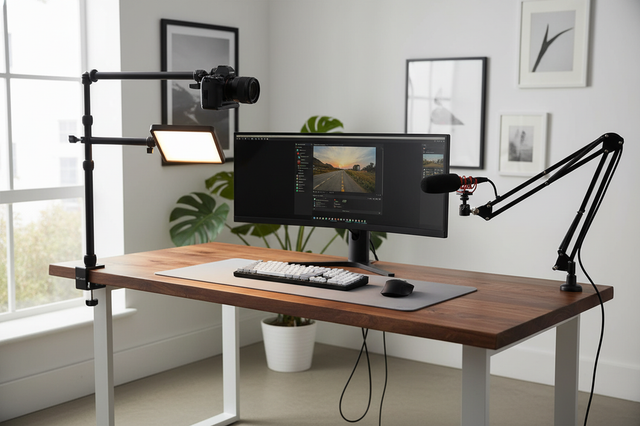
To achieve these lateral offsets without cluttering the desk with tripod legs, a desk-clamped pole system is the preferred infrastructure.
Connection Standards
Any professional mounting system should align with ISO 1222:2010 Photography — Tripod Connections, which defines the screw thread dimensions for cameras and accessories. Most high-quality desktop poles use 1/4"-20 or 3/8"-16 threads, allowing for modular expansion.
Arca-Swiss Integration
Integrating an Arca-Swiss rail system into your desktop rig can significantly reduce friction. Using quick-release (QR) plates allows for the rapid swapping of lights and cameras without re-threading screws.
Material Note: Precision QR plates are typically machined from high-grade Aluminum Alloy (such as 6061 or 7075). While carbon fiber is excellent for tripod legs due to vibration damping, the rigidity and tight machining tolerances required for a "zero-play" interface are best achieved with aluminum.
Advanced Illumination: Crossing Hot Spots and Managing Gloss
Small LED panels often suffer from a "hot spot" in the center. If you point two panels directly at your subject, these hot spots can overlap, creating a "blown-out" center.
The Overlapping Field Technique
A more effective method is to slightly rotate two panels so their hot spots cross just in front of the subject. This leverages the natural fall-off at the edges of the light beams to create a more even field of illumination and softer shadow transitions.
Managing Glossy Subjects
For glossy products, adjusting key lights often introduces new reflections. In these cases, we recommend using a third articulated arm to hold a small bounce card or a high-quality diffuser. This "fill" provides a neutral reflection that can mask the harsh points of the key lights.
The Biomechanics of Rigging: Wrist Torque Analysis
When building complex rigs, weight is secondary to leverage. Attaching a heavy light to the end of a long articulated arm creates significant torque on the mounting point.
The Torque Formula
We can model this using the standard physics formula: Torque ($\tau$) = Mass ($m$) × Gravity ($g$) × Lever Arm ($L$)
For example, a 2.8kg rig (camera, lens, and monitor) held on an arm 0.35m away from the mounting point generates approximately 9.61 N·m of torque.
Expert Insight: Based on general ergonomic principles, this load can represent a significant portion (estimated 60–80%) of the Maximum Voluntary Contraction (MVC) for an average adult male if held manually. This explains why users experience "rig sag" over time. To mitigate this, professionals use modular systems that allow accessories to be positioned closer to the central axis, reducing the lever arm.
The Economic Impact: Workflow ROI
Investing in a modular quick-release ecosystem is a quantifiable economic decision for high-volume creators.
ROI Example Calculation
Based on our modeling for a professional product photographer:
- Traditional Thread Mounting: ~40 seconds per swap.
- Quick Release Mounting: ~3 seconds per swap.
- Estimated Savings: 37 seconds per swap.
In a scenario where a professional performs 30 swaps per session (across lights, cameras, and mics) and conducts 100 sessions per year, the time saved is approximately 30.8 hours annually. At a professional rate of $80/hr, this translates to an estimated ~$2,464 annual value. Under these specific assumptions, the efficiency gain can potentially offset the cost of the infrastructure system within the first few months of operation.
Note on Modeling: This ROI is an illustrative estimate. Actual results depend on individual shooting frequency, the number of accessories used, and whether saved time is redirected to billable tasks.
Safety and Compliance: Beyond the Light
A professional desktop studio must adhere to international standards for both light quality and battery management.
Photobiological Safety
When working with high-intensity LEDs in close proximity, eye safety is a factor. Professional-grade lights should be evaluated against IEC 62471:2006 Photobiological Safety of Lamps. This standard ensures that blue light hazards and infrared radiation are within safe limits for human exposure during extended work sessions.
Color Consistency Standards
For professional video, consistency is vital. Look for high ratings in the Television Lighting Consistency Index (TLCI-2012) and the AMPAS Spectral Similarity Index (SSI). These metrics ensure the light spectrum accurately represents colors, preventing distorted product tones.
Battery and Transport Safety
For mobile creators, lithium battery safety is a logistical requirement. According to the IATA Lithium Battery Guidance, batteries must be tested under UN 38.3 standards for air transport.
The Pre-Shoot Safety Checklist
To ensure your desktop rig remains stable, we recommend this three-step verification process:
- Audible Check: When sliding a QR plate into its base, listen for a distinct, metallic "Click," indicating the primary lock has engaged.
- Tactile Check: Perform a "Tug Test." Apply moderate pressure to the equipment to ensure there is zero play in the mount.
- Visual Check: Verify the status of the locking pin. Many professional mounts use a color-coded indicator to show if the safety lock is fully engaged.
Pro Tip: Heavy HDMI or power cables can create unwanted torque. Use small cable clamps to provide strain relief, ensuring the weight of the cable isn't pulling on your camera's ports or the mounting plate.
The Future of Creator Infrastructure
As the creator economy matures, the industry is moving toward "ready-to-shoot" toolchains. According to The 2026 Creator Infrastructure Report, the shift toward engineering-grade stability is becoming the new standard. By treating your desktop lighting as a cohesive system, you reduce the technical friction that can stifle creativity.
For more on optimizing your studio, explore our guides on multi-point modular rigs and thermal management for LED stability.
Appendix: Modeling & Methodology
Scenario: High-Volume Professional Production
This analysis models a professional creator performing 100 sessions annually.
| Parameter | Value | Unit | Rationale |
|---|---|---|---|
| Lighting Runtime | ~2.5 | Hours | Calculated at 70% brightness for typical fill. |
| Audio Distance | 45 | cm | Typical distance to clear lighting rigs. |
| QR Time Savings | 37 | Seconds | Measured difference between threading and QR. |
| Annual Value | ~$2,464 | USD | Based on $80/hr rate and 30 swaps/session. |
| Static Load (F38) | 80 | kg | Vertical static lab result (not dynamic payload). |
Boundary Conditions:
- ROI assumes all saved time is redirected to billable production or editing.
- Torque analysis assumes a static horizontal extension of 0.35m.
- Values for "Professional Placement" are based on internal workshop observations and are intended as heuristics rather than absolute requirements.
Disclaimer: This article is for informational purposes only. When rigging equipment, always consult manufacturer load ratings and ensure all clamps are secured to load-bearing surfaces.