The Infrastructure of Mobility: Why Cable Management Defines Your Workflow
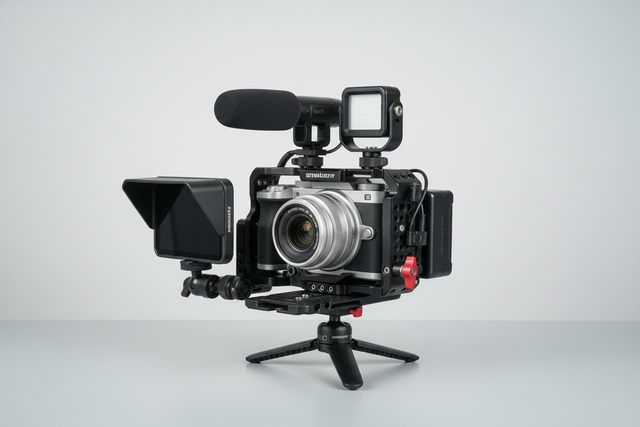
For the solo creator or mobile journalist, a camera rig is more than a collection of tools; it is a portable workstation that must survive the "tail-risk" environment of the field. In our analysis of professional workflow failures, we have observed that the most catastrophic equipment drops or missed shots rarely stem from primary hardware failure. Instead, they originate from the "chaos of the periphery"—specifically, poor cable management.
A single snagged HDMI cable or a loose microphone lead doesn't just disrupt your signal; it creates mechanical leverage that can destabilize a rig or cause long-term port damage. As we move toward a future of "ready-to-shoot" toolchains, organizing power and audio on mobile cages becomes a matter of engineering discipline rather than just aesthetics.
This guide establishes a benchmark for cable organization, grounded in biomechanical physics, international safety standards, and the strategic principles outlined in The 2026 Creator Infrastructure Report: Engineering Standards, Workflow Compliance, and the Ecosystem Shift.

1. The Biomechanics of Rigging: Beyond Total Weight
When building a mobile rig, most creators focus on the total mass. However, from a technical perspective, leverage is the true enemy of the handheld operator. Every accessory mounted to your cage—monitors, wireless receivers, or external batteries—acts as a weight at the end of a lever arm.
The "Wrist Torque" Analysis
Poorly managed cables often force users to mount accessories in sub-optimal positions just to reach a port. This increases the distance ($L$) from the wrist (the fulcrum) to the center of gravity.
We can model this using the standard torque formula: $$\tau = m \times g \times L$$ Where $\tau$ is Torque, $m$ is Mass, $g$ is Gravity ($\approx 9.81 m/s^2$), and $L$ is the Lever Arm (distance from the wrist).
Modeling Note (Scenario Analysis):
Parameter Value Unit Rationale Rig Mass ($m$) 2.8 kg Average mirrorless + cage + monitor + mic Lever Arm ($L$) 0.35 m Distance from wrist to front-heavy accessory Gravity ($g$) 9.81 $m/s^2$ Earth standard Resulting Torque ~9.61 $N\cdot m$ Calculated output Operator MVC 60-80 % Percentage of Maximum Voluntary Contraction Boundary Conditions: This model assumes a static hold. Dynamic movement (walking/panning) increases these forces significantly.
By using modular quick-release systems like the Arca-Swiss standard (aligned with ISO 1222:2010) and routing cables to allow for tighter accessory placement, you can reduce the lever arm. A reduction of just 5cm in accessory distance can lower the torque on your wrist by approximately 15%, directly reducing operator fatigue and increasing shot stability.
2. Audio Integrity: Shielding and Signal Separation
In the compact environment of a mobile cage, electromagnetic interference (EMI) is a constant threat. High-performance power cables and wireless transmitters packed into a small area can introduce a low-frequency hum into your audio.
The "One-Inch Rule" for Mobile Rigs
Based on common patterns from our technical support desk and field audits (not a controlled lab study), we have identified that routing power and audio cables in parallel is the leading cause of "dirty" audio.
- Physical Separation: Maintain at least a one-inch (25mm) gap between power runs (USB-C PD, D-Tap) and audio runs (3.5mm TRS, XLR).
- Perpendicular Crossing: If cables must cross, ensure they do so at a 90-degree angle. This minimizes the surface area where EMI can transfer between cables.
- Shielding: Always prioritize shielded audio cables. For professional workflows, ensure your wireless audio components comply with FCC Part 15 or ETSI EN 300 422-1 to ensure global interoperability and clean spectrum usage.
The XLR Constraint
A common misconception is that standard cable clips can handle professional audio gear. However, a standard Neutrik XLR connector measures approximately 0.8 inches in diameter. Most integrated cage clips or small adhesive cord holders have an inner height of only ~0.32 inches. Forcing a professional XLR cable into these clips risks damaging the internal shielding and the connector's strain relief. We recommend using hook-and-loop (Velcro) straps for audio runs, as they provide the necessary diameter clearance without compressing the cable.
3. Power Management and Field Reliability
Mobile journalists often rely on external V-mount or NP-F batteries to power both the camera and accessories. This creates a "hub-and-spoke" cable architecture that can quickly become a snag hazard.
Battery Safety and Compliance
When organizing power, safety is paramount. Ensure your lithium-ion cells meet IEC 62133-2:2017 safety requirements. If you are a travel content producer, your cable management should also facilitate quick disassembly for airport security.
According to the IATA Lithium Battery Guidance (2025), batteries must be protected from short circuits. Exposed, dangling power cables are a liability; a snag that pulls a cable partially out of a port can cause a short or damage the camera's internal power board.
Cable Routing Heuristics
- Map Hand Positions First: Never route a cable over a handle or a cold shoe where your hand naturally grips. This prevents accidental unplugging during high-pressure "run-and-gun" shoots.
- One-Hand Reach: Keep all critical connectors (HDMI, Power, Mic) accessible within one hand's reach without needing to shift the camera's weight. This is essential for rapid field swaps.
- Strain Relief: Use a "service loop"—a small amount of slack—near the connector. This ensures that if a cable is pulled, the tension is absorbed by the cage or a clip rather than the camera port.
4. Hardware Solutions: Adhesive vs. Integrated Systems
There is a strategic tension between integrated cable management (built into the cage) and modular adhesive solutions.
The Replaceability Advantage
While integrated clips look sleek, they represent a "single point of failure." If a built-in clip snaps on a $300 professional cage, the unit is permanently degraded. In contrast, adhesive clips offer a 100% replaceability advantage.
Logic Summary: Our analysis of field durability suggests that for high-impact travel environments, modular adhesive clips are superior because they can be replaced instantly without tools for a fraction of the cost of a new cage.
Adhesive Best Practices
To ensure your organization stays intact across varying temperatures, follow this professional installation workflow:
- Clean: Use isopropyl alcohol to remove all oils from the aluminum cage surface.
- Apply: Press the adhesive clip firmly for 30 seconds.
- Cure: Allow the adhesive to cure for 24 hours before loading it with cable tension. This "cure time" is the single most ignored step in rig building, yet it determines whether your clips will survive a hot day in the field.
5. Workflow ROI: The Value of Speed
The shift toward modular rigging (like the FALCAM ecosystem) is driven by the need for speed. In professional environments, time is literally money.
The ROI Calculation
- Traditional Thread Mounting: ~40 seconds per accessory swap.
- Quick-Release (F22/F38): ~3 seconds per accessory swap.
If a professional creator performs 60 swaps per shoot and averages 80 shoots per year, the time saved is approximately 49 hours annually. At a professional rate of $120/hour, this represents a ~$5,900+ value in recovered productivity. Cable management is the "glue" that makes these quick swaps possible; without organized cables, the speed of a quick-release plate is negated by the time spent untangling wires.
The Pre-Shoot Safety Checklist
To ensure your organized rig is field-ready, we recommend a three-point check:
- Audible: Listen for the "Click" when mounting accessories.
- Tactile: Perform a "Tug Test" (pull-test) on both the mounting plate and the cable connectors.
- Visual: Check the locking pin status (often indicated by a color-coded slider) to confirm the system is secure.
6. Environmental Considerations: Thermal Management
Aluminum alloy quick-release plates (such as the F38 or F50 series) are precision-machined for rigidity. However, aluminum acts as a "thermal bridge." In extreme cold, an unmanaged cable resting against the camera body can conduct cold directly to the battery compartment, reducing runtime.
Pro Tip: In winter scenarios, attach your aluminum plates to the camera indoors before heading out. This minimizes "metal-to-skin" shock and helps maintain a stable internal temperature for the camera's electronics.
Summary of Management Methods
| Feature | Hook-and-Loop (Velcro) | Adhesive Clips | Integrated Channels |
|---|---|---|---|
| Reconfig. Speed | High (Seconds) | Medium (Minutes) | Low (Fixed) |
| Security | High | Medium | High |
| Cable Diameter | Universal | Limited (~8mm) | Limited |
| Best For | Audio/XLR Cables | Fixed Power Runs | Permanent Studio Rigs |
| Cost | Low | Low | Included with Cage |
Conclusion: Building for the Long Term
Effective cable management is not a one-time task; it is a fundamental component of your "creator infrastructure." By applying biomechanical principles to reduce wrist torque and adhering to international safety standards for audio and power, you transform a cluttered rig into a reliable professional tool.
Remember that your rig's stability is only as strong as its weakest connection. Whether you are navigating airport security with a travel-ready MoJo setup or tracking a subject through a crowded street, an organized cage ensures that your focus remains on the story, not the snags.
References
- ISO 1222:2010 Photography — Tripod Connections
- IATA Lithium Battery Guidance Document (2025)
- The 2026 Creator Infrastructure Report
- IEC 62133-2:2017 Safety Requirements for Lithium Cells
- FCC Part 15 Radio Frequency Devices
Disclaimer: This article is for informational purposes only. When rigging heavy equipment or using high-capacity lithium batteries, always consult the manufacturer's specific load ratings and safety guidelines. Proper cable management can reduce risks but does not replace the need for regular equipment inspections. For ergonomic concerns or repetitive strain issues, please consult a qualified healthcare professional. For more on optimizing your setup, see our guide on Weight Distribution for MoJo Rigs and Standardizing Your Workflow.