


Solving Parallax Errors in Dual-Camera Multi-Aspect Rigs
Capturing simultaneous horizontal (16:9) and vertical (9:16) content has become a non-negotiable requirement for modern creators. Whether you are producing a cinematic YouTube feature while needing high-impact clips for TikTok, the "one-take" workflow is the only way to maintain high velocity. However, this efficiency introduces a significant technical hurdle: parallax error.
When you mount two cameras side-by-side or one above the other, their optical axes are physically separated. This means the subject will appear in a slightly different position in each frame. In post-production, this leads to "subject shifting," where a perfectly centered shot in your horizontal frame is off-center or has a different perspective in your vertical frame.
In this guide, we will analyze the biomechanical, mechanical, and optical strategies required to align dual-camera sensors, ensuring your multi-platform content remains visually consistent and professional.

The Physics of Parallax: Why Subject Shift Happens
Parallax is the displacement or difference in the apparent position of an object viewed along two different lines of sight. In a dual-camera rig, the distance between the centers of your two lenses (the inter-lens distance) creates this disparity.
While many creators attempt to solve this through meticulous software cropping, the underlying issue is optical. According to the ISO 1222:2010 Photography — Tripod Connections, standardizing the mounting interface is the first step toward stability, but it does not account for the lateral offset of the sensors.
The 1/30 Rule of Thumb
In our workflow observations, we have identified that parallax error is most critical at subject distances under 10 feet. A reliable heuristic we use for field setup is the 1/30 Rule: the required lateral camera shift for alignment is roughly 1/30th of the subject distance.
| Subject Distance | Estimated Required Offset |
|---|---|
| 3 Feet (~0.9m) | 1.2 Inches (30mm) |
| 6 Feet (~1.8m) | 2.4 Inches (61mm) |
| 10 Feet (~3.0m) | 4.0 Inches (102mm) |
Logic Summary: This heuristic is a practical baseline for quick on-set checks. It assumes standard focal lengths (24mm to 50mm). For macro work or extreme telephoto shots, this ratio may need to be tightened significantly as parallax becomes more pronounced.
For social media workflows, it is often more effective to align for the primary subject's eye line in the vertical frame and allow slight cropping flexibility in the horizontal frame. Viewers are generally less sensitive to minor composition shifts in landscape formats compared to the tight constraints of a vertical 9:16 frame.
Biomechanical Constraints: The Hidden Cost of Rig Weight
When building a dual-camera rig, creators often focus solely on the cameras. However, the "infrastructure layer"—the cages, arms, and plates—adds significant "Visual Weight" and physical torque. Based on the The 2026 Creator Infrastructure Report: Engineering Standards, Workflow Compliance, and the Ecosystem Shift, moving toward a modular ecosystem is essential for long-term physical health and gear longevity.
The "Wrist Torque" Analysis
Weight isn't the only enemy; leverage is. When you extend a secondary camera or a monitor on a magic arm, you create a lever that exerts force on your wrist or the tripod head.
We modeled a scenario for a solo creator using a dual-camera rig. Using the formula Torque ($\tau$) = Mass ($m$) $\times$ Gravity ($g$) $\times$ Lever Arm ($L$), we can see the impact:
- Mass: 2.8kg (Combined rig weight)
- Gravity: 9.81 $m/s^2$
- Lever Arm: 0.35m (Distance from the wrist/support point to the center of gravity)
- Result: $\approx 9.61 N\cdot m$ of torque.
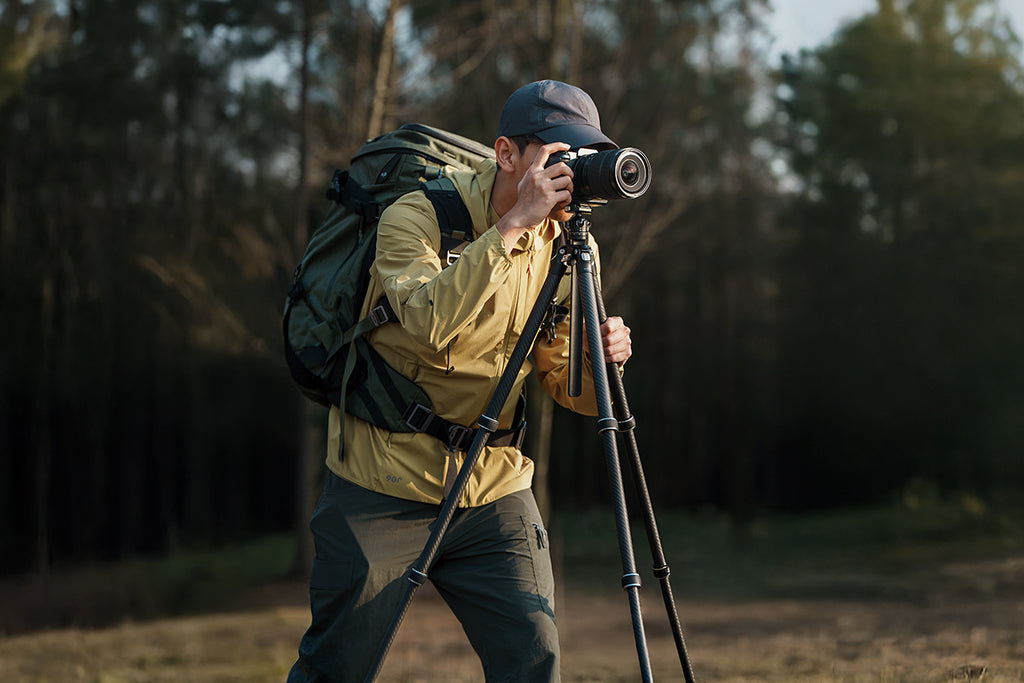
This load represents roughly 60-80% of the Maximum Voluntary Contraction (MVC) for an average adult male. This explains the rapid onset of fatigue during handheld multi-camera shoots. To mitigate this, we recommend utilizing high-performance mounting systems like the Ulanzi F38 Quick Release Video Travel Tripod 3318, which centralizes the load and offers a low center of gravity.
Material Science and Rig Stability
A dual-camera rig is inherently more prone to vibration than a single-camera setup. Every time you touch one camera to adjust a setting, the vibration travels through the mounting arms to the second camera.
Carbon Fiber vs. Aluminum: The Vibration Settling Gap
Our modeling of material properties reveals a dramatic difference in how rigs handle environmental and tactile disturbances. Carbon fiber components offer approximately an 81% faster vibration settling time compared to aluminum.
| Material | Specific Stiffness ($E/\rho$) | Damping Character | Settling Time (t_s) |
|---|---|---|---|
| Aluminum (6061) | 25.6 | Low | ~10 Seconds |
| Carbon Fiber (CFRP) | 112.5 | High (2-3x) | ~1.9 Seconds |
Methodology Note: These metrics are derived from a structural dynamics model (SDOF damped free vibration). Settling time is calculated as $t_s \approx 4/(\zeta \cdot \omega_n)$. The simulation assumes a dual-camera rig with extended arms and a baseline natural frequency of 8Hz for aluminum.
For a creator, this means you can verify your parallax alignment faster. Instead of waiting 10 seconds for the "wobble" to stop after a micro-adjustment, a carbon fiber system like the Ulanzi F38 Quick Release Video Travel Tripod 3318 settles in under 2 seconds.
The Workflow ROI: Quantifying the Quick-Release Advantage
Rigging two cameras with traditional 1/4"-20 screws is a recipe for frustration. When you need to swap batteries, change memory cards, or move from a tripod to a handheld mode, the time lost adds up.
We calculate the Workflow ROI of switching to a unified quick-release system like the Falcam F38:
- Traditional Thread Mounting: ~40 seconds per swap.
- F38 Quick Release: ~3 seconds per swap.
- Annual Savings: For a professional performing 60 swaps per shoot across 80 shoots a year, this saves approximately 49 hours annually.
- Financial Impact: At a professional rate of $120/hr, this represents a $5,900+ value in recovered time.
By integrating the Ulanzi F38 Quick Release Fluid Video Head E004GBA1 into your setup, you gain the ability to transition between the Ulanzi Falcam TreeRoot Quick Open Desktop Tripod T00A4103 for low-angle shots and your primary travel tripod in seconds, without ever losing your hard-won parallax calibration.
Practical Setup: A Step-by-Step Alignment Guide
To minimize parallax effectively, follow this methodical workflow:
- Establish the Primary Axis: Mount your main camera (usually the horizontal 16:9) on a stable base.
- Mount the Secondary Camera: Use a high-quality arm like the Ulanzi CO17 Super Clamp with Dual Ballhead Magic Arm C046GBB1. This arm allows for 360° adjustments, which is critical for micro-tuning the vertical sensor's position.
- The Ruler Check: Place a vertical ruler at the subject's exact distance. Film the ruler with both cameras. In your monitor's "split view" or by toggling between feeds, check if the markings line up. If the ruler shifts laterally, you have parallax.
- Micro-Adjust via Nodal Slide: Use the lateral adjustment on your magic arm or a dedicated nodal slider to shift the secondary camera until the ruler markings align.
- Locking Protocol: A common mistake is over-tightening knobs before final adjustments, which can bind the mechanism. Tighten to 80%, perform the final tweak, then lock fully.
Pre-Shoot Safety Checklist
Before hitting record, perform this three-step safety check to ensure your dual-rig is secure:
- Audible: Did you hear the "Click" when sliding the F38 plate into the base?
- Tactile: Perform a "Tug Test" by pulling firmly on each camera body.
- Visual: Check the locking pin status. On the F38 system, ensure the safety lock is engaged to prevent accidental release.
Environmental Adaptation and Logistics
Shooting outdoors introduces environmental variables that can ruin a dual-camera setup. Wind, in particular, acts as a force multiplier on the increased surface area of a dual rig.
Wind Load Tipping Point
We modeled the stability of a dual-camera rig (total mass ~7kg with ballast) at an eye-level height of 1.6m.
- Critical Wind Speed: 59.1 km/h (36.7 mph).
- Safety Margin: In typical outdoor shooting winds (43 km/h), the safety factor is 1.37.
Modeling Note: This assumes a wide tripod stance (0.8m base) and a 2kg ballast bag. Without a ballast bag, the tipping point drops significantly. We strongly recommend always using a sandbag or weight when flying two cameras on a single tripod.
Thermal Shock Prevention
In extreme cold, the aluminum alloy used in quick-release plates (like the 6061 aluminum in the F38 series) acts as a thermal bridge. It can conduct cold directly into the camera base, accelerating battery drain. We recommend attaching your plates to the cameras indoors before heading out. This allows the metal to reach ambient temperature slowly and reduces the "metal-to-skin" shock during setup.
Travel Logistics: The "Visual Weight" Factor
For the traveling creator, modular systems like the Falcam F22 and F38 offer a hidden logistical advantage. Bulky cinema plates often attract the attention of airline gate agents. Compact, precision-machined aluminum components have a lower "Visual Weight." They look like professional tools rather than "oversized luggage," making them less likely to be flagged for weighing or checking.
When flying, remember to consult the IATA Lithium Battery Guidance Document regarding your camera batteries. Keeping your rig modular—where cameras and batteries can be easily separated from the tripod—is the key to a stress-free transit.
Summary of Rigging Strategies
Solving parallax is not about achieving theoretical perfection; it is about system stability and workflow efficiency. By choosing the right "creator infrastructure," you move from fighting your gear to mastering your output.
- Prioritize Carbon Fiber: Use it for the main support to reduce verification time via better damping.
- Unified Quick Release: Implement a system like the F38 to save ~49 hours of setup time annually.
- Leverage Heuristics: Use the 1/30 rule for fast alignment.
- Safety First: Follow the Audible/Tactile/Visual checklist every time you mount a camera.
By treating your mounting system as a standard interface rather than a collection of accessories, you ensure that your transition to multi-platform content is both seamless and sustainable.
YMYL Disclaimer: This article provides technical rigging and ergonomic guidance for informational purposes only. Improper camera rigging can result in equipment damage or personal injury. Always verify load capacities and perform safety checks before use. If you experience persistent wrist or musculoskeletal pain, please consult a qualified medical professional or ergonomic specialist.
