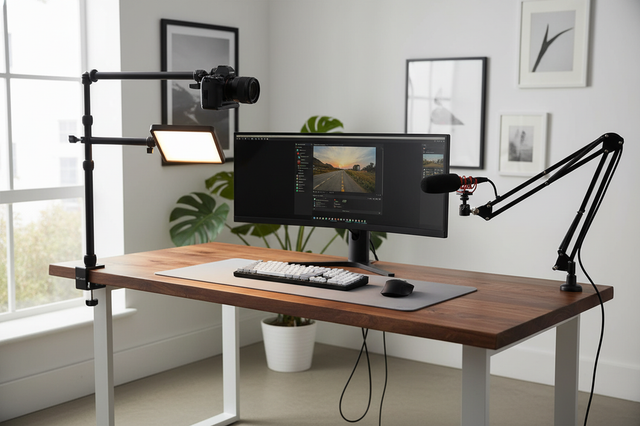
An overhead desk camera mount solves the biggest desk-filming problem: floor tripods eat workspace. If you want clean top-down framing for unboxings or tabletop tutorials, a clamp-based rig usually keeps your desk usable while giving you a repeatable angle.

Why Overhead Rigs Beat Floor Tripods
For desk-based creators, the main win is space, not just camera angle. An overhead rig keeps the floor clear and makes it easier to return to the same framing from one recording session to the next, which matters when you film small products, package reveals, or hands-on demos.
The basic trade-off is simple: a floor tripod can be easier to understand, but it often forces you to work around legs, stands, and awkward placement. A desk-mounted overhead setup usually stays closer to the subject and better fits a copy-stand style workflow when the desk itself is the main shooting surface.
One useful decision sentence: if your desk is already crowded, the overhead desk camera mount is usually the better fit; if you need frequent full-room repositioning, a floor tripod may still be simpler.
For a broader mounting browse path, the Mounting Accessories collection is a useful place to compare desk-friendly support options.
Choose the Right Clamp and Arm
The clamp and arm matter more than the camera body in many desk setups. A strong clamp that matches the desk edge shape helps the rig stay put, while the arm determines how far you can reach over the center of the desk without crowding the workspace.
Clamp Grip and Desk Thickness
The first check is fit, not force. The clamp should match the desk edge thickness and surface shape closely enough to hold without sliding, especially on rounded or irregular edges. That is why the right answer is not "the strongest clamp," but "the clamp that fits this desk cleanly."
A practical rule: if the clamp contact area is shallow or the desk lip feels awkward, treat the setup as a maybe, not a yes. A desk-arm style mount can work well only when the edge and grip line up.

Arm Reach and Angle Control
Longer reach makes center-of-desk framing easier, but it also increases leverage. That means a longer arm can be useful for a wide unboxing mat, but it is less forgiving on a desk that flexes or sits close to a wall.
If you mostly film small products, a shorter reach can be the safer and cleaner choice. If you need the camera to clear a monitor or hang farther forward, a longer arm may be worth the added setup care.
Head Movement for Framing Adjustments
Ball heads and tilt joints make overhead framing easier because you can fine-tune angle without rebuilding the whole rig. That matters when you switch between a centered top-down shot and a slightly angled tutorial view.
In practice, a camera mount that adjusts smoothly saves more time than one that looks flexible on paper but drifts after each touch. For frequent re-aiming, compare options such as the Ulanzi CO17 Super Clamp with Dual Ballhead Magic Arm C046GBB1.
Quick-Release Convenience for Frequent Swaps
Quick-release hardware helps when you move the same camera between overhead and handheld uses. The value is not just speed; it is repeatability, because a matched plate returns to the same position more reliably than a loose re-mount.
That said, quick release only helps if the pieces stay compatible across your setup. If you swap cameras often, the Claw Quick Release Series is the kind of collection that can reduce rebuild time, while a standard clamp arm may be enough for fixed desk work.
Match the Mount to Your Desk
Not every desk can handle an overhead rig equally well. The desk edge, the rear clearance, the monitor placement, and the desk's rigidity all change how safe and convenient the setup feels.
| Desk Condition | What To Check First | What It Usually Favors |
|---|---|---|
| Thick or rounded edge | Clamp contact and bite | Shorter arm or a different clamp style |
| Hollow or flexible desktop | Flex under arm reach | Conservative reach and lighter accessories |
| Monitor close to rear edge | Clearance over the screen | Higher placement or a different mounting point |
| Wall or shelf behind desk | Swing path for the arm | Shorter reach or offset positioning |
| Messy cable path | Whether cables tug during movement | Better routing before adding more weight |
The point is not to force every desk into the same setup. A solid-sounding overhead desk camera mount can still be a poor fit if the rear wall is too close or the desk flexes when the arm extends.
One quotable filter: if the clamp fit is marginal, the desk flexes, or the arm must fight the monitor for space, the setup is usually not worth pushing.
A helpful browsing path for desk-based supports is the Desk Stands collection, especially if you are comparing support styles instead of a single arm.
Desk fit guide for overhead camera mounts
Use this as a quick fit check: the mount type depends on how the desk edge, rear clearance, rigidity, monitor space, and cable routing line up. A short-reach clamp arm is the safest fit when the setup is tight but stable; a longer boom helps when the camera must reach past obstacles; a no-go/reconsider setup is best when the desk cannot support a clean, secure path.
| Scenario | Good fit | Possible fit | No-go / reconsider |
|---|---|---|---|
| Desk edge thickness/shape | Strong match on flat edge | Partial contact | Rounded or thin lip |
| Rear clearance | Open space behind desk | Minor obstruction | Wall or shelf blocks swing |
| Desk rigidity | Solid surface | Slight flex | Hollow or bouncy top |
| Monitor clearance | Camera clears screen | Minor repositioning needed | Arm collides with monitor |
| Cable routing | Clean path | Minor rerouting | Cables cross work area |
Place Camera and Light for Even Coverage
For most tabletop videos, the camera should sit high enough to show the whole work area without forcing extreme cropping later. That makes the setup more forgiving when you switch between a compact product and a larger box.
Lighting usually works best when it supports the overhead frame instead of fighting it. A fill light placed near the camera axis can reduce hand shadows, while a slight angle offset can reduce glare on glossy packaging and labels.
If you are building a setup for filming tabletop videos with overhead camera and light, the main check is reflection path. Keep the light out of the camera's direct reflection line, then test with the actual product size you film most often.
A helpful lighting browse path is the LED Video Light collection, especially if you need a compact light that fits a desk rig without dominating the workspace.
For a practical shadow-management refresher, see pocket LED positioning, which is useful when you want to keep the light close without making the frame harsh.
Keep the Rig Stable and Tidy
Stability comes from small habits, not one big spec. Start with the desk edge, then the clamp, then the arm, then the cable path. That order reduces the chance of rebuilding the rig after you notice a wobble or tug mid-shoot.
- Test the desk edge before loading the arm so you know the surface can resist twist and downward pull.
- Tighten joints gradually. Repeated over-tightening can weaken mounting accessories over time, especially when you keep reconfiguring the arm.
- Keep arm extension as short as your shot allows, because leverage increases as the camera moves farther from the clamp.
- Route cables so they do not tug the camera when the desk moves or your hand brushes the arm.
- Run a short test recording and a small shake test before trusting the rig for a real shoot.
That sequence matters because a stable rig can still become annoying if the cable path crosses your keyboard or mouse area. If your desk gets bumped often, a cable-aware overhead rig is usually easier to live with than a prettier setup that constantly shifts.
One more decision sentence: if the rig only feels stable when you stop touching it, it is not stable enough for regular desk recording.
For a safety-minded alternative angle, the overhead rig safety tethering guide is worth a look when you want an extra layer of protection in a more permanent setup. Test-before-recording and cable routing checks are also recommended in practical DIY guides.
Build a Repeatable Desk Workflow
Repeatable setups save the most time over the long run. Mark the clamp position, leave enough cable slack for small angle changes, and keep the tools you reach for most within arm's reach so the overhead rig does not slow down each session.
A quick-release workflow helps here because it makes camera swaps faster and more predictable. If you switch between overhead work and handheld shots, that consistency is usually worth more than a tiny gain in convenience from a looser setup.
This is also where a tripod can still make sense. If you move between rooms or need a totally different shooting height, a Tripods collection can be the simpler choice. The overhead desk camera mount is best when your main work happens at one desk and you want that desk to stay functional.
Before your next recording, save one framing reference for your most common product size, then recheck stability anytime you change camera weight, add a light, or move the mount to another desk.
FAQs
Q1. How Do I Know If My Desk Can Hold an Overhead Camera Mount?
Look at the edge shape, how much the desktop flexes when you lean on it, and whether the arm can swing without hitting a wall or monitor. If the clamp only grabs a tiny lip or the desk bends easily, treat the setup as a candidate for a different mounting point.
Q2. What Camera Weight Is Safe for a Desk Clamp Rig?
The camera body alone is not the full answer, because lens weight, arm reach, and any light or accessory all change the working feel. A lighter setup on a short arm is usually easier to manage than a heavier setup stretched far from the clamp.
Q3. Can I Mount Both a Camera and a Light Over My Desk?
Yes, but only if the load is split in a way that does not crowd the same joint or force the arm into a bad angle. The better question is whether the light can sit close enough to help the frame without creating glare or shadow problems.
Q4. How Do I Keep the Camera From Shaking During Recording?
Shorten the arm as much as your shot allows, recheck joint tension, and stop cable tug before it reaches the camera. If the desk itself moves when you type or rest your hand on it, the mount will need a more conservative layout.
Q5. What's the Best Way to Reposition the Mount for Different Products?
Mark the preferred clamp position, save a reference shot, and use quick-release hardware if you change cameras often. That makes it easier to return to the same framing for a small item, then widen the shot later for a larger box.
Next Steps for a Cleaner Desk Setup
Test the desk edge first, choose a clamp that fits cleanly, then keep the arm short. If flex, monitor crowding, or messy cables appear, step back before adding hardware. A matched overhead desk camera mount should simplify filming without dominating the workspace. Mark positions and run a quick stability check before each session.