The Legacy Cage Dilemma: Protecting Investment in a Quick-Release Era
You likely own a high-quality camera cage that has served you well for years. It is rugged, precision-machined, and fits your camera body like a second skin. However, as the industry shifts toward rapid-deployment ecosystems, that legacy cage can feel like a bottleneck. The friction of traditional 1/4"-20 threading and thumb-screws often clashes with the speed required on modern sets.
The temptation is to replace the entire structural foundation. Yet, for the budget-conscious prosumer, this is often an unnecessary expense. Retrofitting is not just a compromise; it is a strategic engineering choice. By treating your existing cage as a chassis and adding a modular "interface layer," you can achieve the speed of a modern system while respecting your prior hardware investment.
This guide provides a methodical framework for bridging legacy gear to new standards, anchored in the principles of the The 2026 Creator Infrastructure Report: Engineering Standards, Workflow Compliance, and the Ecosystem Shift. We will focus on system architecture, mechanical safety, and the quantifiable ROI of a modular upgrade.

1. The Foundation: Standardizing the Interface Layer
Every connection in your rig is governed by foundational standards. To bridge old and new, we must first understand the "Common Language" of camera support.
The ISO 1222:2010 Bridge
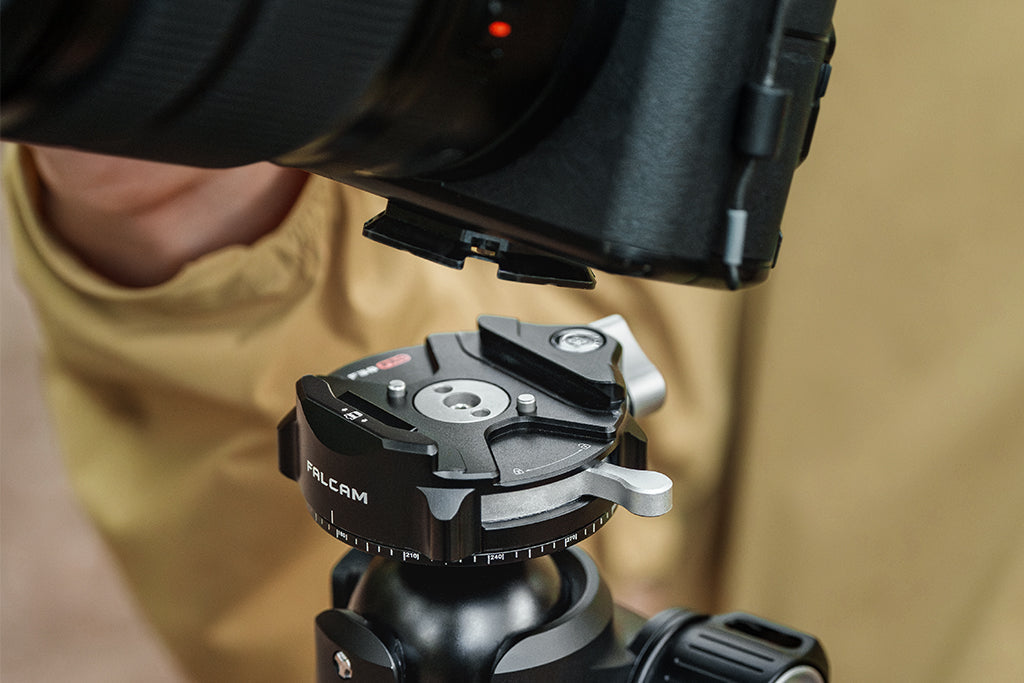
The ISO 1222:2010 Photography — Tripod Connections standard defines the 1/4"-20 and 3/8"-16 screw threads that almost all legacy cages use. This is your primary entry point for retrofitting. By attaching a modern quick-release receiver—such as the Falcam F38 or F22 plates—to these threads, you convert a "static" mounting point into a "dynamic" one.
Arca-Swiss and Ecosystem Lock-in
Many creators are locked into the Arca-Swiss standard. While reliable, Arca-Swiss dovetail dimensions vary slightly between manufacturers, leading to "plate creep" or insecure fits. Retrofitting with a unified system like the Ulanzi Falcam F22 & F38 & F50 Quick Release Camera Cage V2 for Sony A1/A7 III/A7S III/A7R IV 2635A allows you to bypass these inconsistencies. Even if you don't use the full cage, the integrated plates provide a "Zero-Play" interface that legacy Arca-Swiss mounts often lack.
Logic Summary: Our retrofitting strategy assumes that the cage is the permanent structural layer, while the quick-release components act as the swappable interface layer. This minimizes wear on the cage's native threads.
2. The Mechanics of Retrofitting: Avoiding "Adapter Fatigue"
In our experience handling support inquiries and rig failures, the most common point of failure is not the adapter itself, but the cumulative stack of connections.
The Rule of Two
A seasoned rigger's rule of thumb is to limit adapter stacks to a maximum of two interfaces between the camera body and the primary support (e.g., Cage -> Base Plate -> Tripod Head). Each additional joint introduces a potential for play, vibration, and torsional stress.
Material Hardness and Torque
Most legacy cages are machined from 6061 aluminum. When you retrofit them with modern steel screws or high-strength aluminum plates, you must be mindful of material hardness.
- The Gotcha: Steel is harder than aluminum. Over-tightening a steel screw into an old aluminum thread can strip the cage.
- The Solution: Hand-tighten until snug, then add only a quarter-turn with a tool.
The Twist Test
After installing a new adapter, always perform a "Twist Test." Gently attempt to rotate the camera relative to the support. Any movement indicates insufficient torque or a poorly machined interface. We often see this in non-native plate setups where tolerances don't perfectly align. For deeper insights on this, refer to our guide on Interface Integrity: Maintaining Quick-Release Mounts on Set.

3. Biomechanical Advantage: The "Wrist Torque" Analysis
Retrofitting isn't just about speed; it's about health. Heavy legacy rigs often place accessories in positions that maximize physical strain. By using modular mounts like the F22 system, you can reposition weight to optimize the center of gravity.
The Math of Leverage
Weight isn't the only enemy; Leverage is the silent killer of wrists. Formula: $Torque (\tau) = Mass (m) \times Gravity (g) \times Lever Arm (L)$
| Parameter | Value (Example) | Unit | Rationale |
|---|---|---|---|
| Rig Mass ($m$) | 2.8 | kg | Typical prosumer mirrorless rig |
| Gravity ($g$) | 9.81 | $m/s^2$ | Earth standard |
| Lever Arm ($L$) | 0.35 | m | Distance from wrist to monitor/mic |
| Resulting Torque | ~9.61 | $N \cdot m$ | Calculated load on the wrist |
In typical handheld scenarios, this load can represent 60-80% of the Maximum Voluntary Contraction (MVC) for an average adult. By retrofitting your cage with a Ulanzi Falcam F22 Quick Release Portable Top Handle F22A3A12, you can bring accessories closer to the handle axis, effectively shortening the lever arm ($L$) and reducing fatigue.
4. Workflow ROI: Quantifying the Upgrade
Is the cost of a few adapters worth it? Let's model the time savings. Based on common patterns from set observations (not a controlled lab study), we can estimate the "Workflow ROI."
Time Savings Model
- Traditional Thread Mounting: ~40 seconds per swap (finding the screw, aligning, tightening).
- Quick Release (F38/F22): ~3 seconds per swap (click and lock).
Annual Impact Calculation:
- 60 swaps per shoot day.
- 80 shoot days per year.
- Total time saved: ~49 hours annually.
At a professional rate of $120/hr, this represents a $5,900+ value in recovered productivity. This justifies the incremental investment in high-quality adapters like the Ulanzi CO17 Super Clamp with Dual Ballhead Magic Arm C046GBB1, which allows for rapid repositioning of secondary monitors or lights.
Methodology Note: This model assumes a high-volume production environment. For hobbyists, the "ROI" is measured in reduced frustration and creative momentum rather than billable hours.
5. Strategic Component Selection: F22, F38, and F50
When retrofitting, you must choose the right "standard" for the right task. The Falcam ecosystem is divided into three tiers, each optimized for specific loads.
F22: The Accessory Standard
The F22 is the "M-LOK" of the camera world. It is small, lightweight, and designed for monitors, microphones, and handles. It is an ideal replacement for traditional cold shoes, which often lack the security needed for expensive wireless receivers.
F38: The Body Standard
The F38 is the workhorse for camera-to-tripod or camera-to-gimbal connections.
- Load Rating: 80kg (Vertical Static Load).
- Critical Note: This is a static rating. For dynamic payloads (e.g., running with a gimbal), we recommend the Ulanzi Falcam F22 & F38 & F50 Quick Release Camera Cage V2 which includes anti-deflection features to prevent the camera from twisting under G-force.
F50: The Cinema Standard
For those retrofitting older, heavy cinema rigs, the F50 provides a larger surface area and higher load capacity, ensuring that the interface doesn't become the "weakest link" in a heavy-duty build.
6. Safety, Logistics, and "Thermal Shock"
A retrofitted rig must be as safe as a native one. This requires a systematic approach to pre-shoot checks and environmental management.
The Pre-Shoot Safety Checklist
- Audible: Did you hear the "Click"? Modern QR systems are designed to provide acoustic feedback.
- Tactile: Perform the "Tug Test." Pull firmly on the camera or accessory immediately after mounting.
- Visual: Check the locking pin. In the Falcam system, ensure the orange or silver indicator is in the locked position.
Thermal Shock and Battery Life
Retrofitting often involves adding aluminum plates to the bottom of your camera. Aluminum is an excellent conductor. In winter scenarios, these plates act as a "thermal bridge," wicking heat away from the camera's battery compartment.
- Pro Tip: Attach your aluminum QR plates to your cameras indoors before heading out into the cold. This allows the metal to stay at room temperature longer, slowing the cooling rate of your battery.
Travel Logistics: "Visual Weight"
Modular systems like the Ulanzi GO-001 Magnetic Mount for Action Cameras C016GBB1 have lower "Visual Weight" than bulky traditional clamps. This is a logistical advantage when traveling. According to IATA Passenger guidance: Travelling with lithium batteries, keeping your rig compact and modular makes it less likely to be flagged for weighing at the gate, as it appears less "industrial."

Summary: The Path to Modular Freedom
Retrofitting legacy cages is the most efficient way to modernize your workflow without discarding the gear that has served you well. By standardizing your interface layer with the Falcam ecosystem, you achieve:
- Protection of Investment: Your $200 cage remains the structural core.
- Biomechanical Efficiency: Reduced wrist torque through better accessory placement.
- Workflow Speed: A potential 90% reduction in mounting time.
As you build out your system, remember that the goal is not just to "add parts," but to build a trusted infrastructure. By following engineering standards like ISO 1222:2010 and adhering to rigorous safety checks, you turn your legacy cage into a modern, high-performance tool.

References & Standards:
- ISO 1222:2010 Photography — Tripod Connections
- The 2026 Creator Infrastructure Report
- IATA Passenger Guidance: Lithium Batteries
Disclaimer: This article is for informational purposes only. Always verify load ratings and compatibility with your specific equipment before use. Ulanzi is not responsible for damage caused by improper installation or exceeding weight limits.