For a face-led seated tutorial, set your phone tripod height so the camera lens sits near your eye line while you're seated in your recording chair. No single number in inches fits everyone, because your chair, posture, and desk all change where your eyes end up.

The work surface changes the rule. When your hands and the tabletop are the main subject, let them set the camera angle. When you need both your face and the work, decide which one needs the clearest view, then check the phone's preview before you hit record.
Start with the phone's lens near seated eye level
If your face is the main subject, put the phone's camera lens about level with your eyes, measured while you sit exactly as you will during the take. University video guidance recommends eye-level camera placement for phone video, and that is the starting point for a talking-to-camera tutorial.
Sit down first. Settle into the actual chair, at the actual desk, with the posture you'll hold while you teach. Leaning back, sitting tall, or raising a desk chair can move your eye line by several inches, so a height you set while standing over the tripod won't match.
Next, line up the lens, not the tripod. A tripod's maximum height tells you how far it can extend, not where your lens will land. The top edge of the phone holder is not the lens either. The lens sits near one end of the phone, and turning the phone from portrait to landscape moves it. Raise or lower the tripod until the lens itself sits near your eye line, then look at the preview to see how much of your face, shoulders, and background fit in the frame.
If a small desk stand can't bring the lens up that high, full-size tripods that stand on the floor beside the desk are one way to get there. Filming alone for the first time? Our solo filming setup for beginners covers the other basics too, like sound and light.
Keep this eye-line rule for face-led shots only. A tabletop demonstration needs a different starting point.

For tabletop-only shots, point the view toward the work
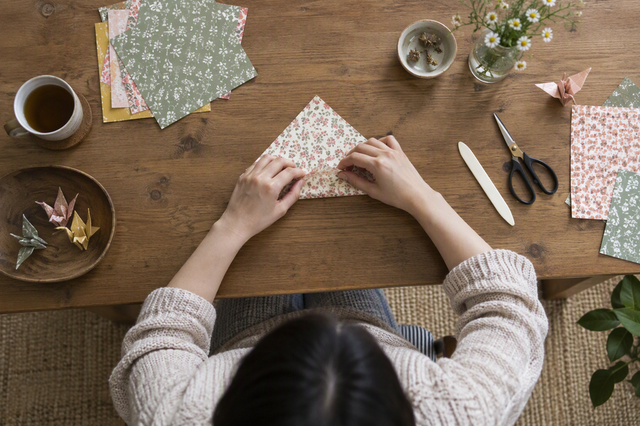
When the hands and work surface carry the tutorial, forget about matching your eye line and aim the camera at the action. Extension guidance on choosing an angle for a demonstration shot describes both overhead and angled views, picked to suit what the viewer needs to see.
- Name what must stay visible. Before you touch the tripod, list the hands, tools, and part of the table that viewers need to follow. Say you're lettering a card: the pen tip, the paper, and your ink bottle might be the whole list.
- Pick angled or overhead. An angled view looks down at the table from the front or side. It shows depth and some of the space around the work. An overhead view looks straight down and gives a flat, top-down map of the work area. That suits tasks where layout matters, like cutting patterns or arranging small parts.
- Aim and set the frame around that area. Set the height and tilt so the listed items fill most of the frame without spilling off the edges. For a steady top-down setup, our overhead POV rig guide walks through desk-clamped options. If you use a clamp arm that reaches out over the table, check the desk clamp leverage limits before you mount a phone at the far end.
- Run through the motions on the preview. Do each step of the demo once while you watch the screen. If a hand, tool, or finished piece slides out of frame, move the camera back, change the tilt, or shift your work area, then try again.
For a face-and-work shot, choose what needs the clearest view
One phone can show both you and your work, but first pick which one matters more. Research on framing a presenter and activity with one camera in how-to videos describes the same tradeoff. A single camera must favor one subject or pull back to a wider shot that holds both.
If your face leads, start from the eye-line position above. Then tilt the phone down slightly, or move it back, until the front edge of your work area comes into view. This works well when you mostly talk and only sometimes show an object, such as holding up a finished project.
If the work leads, let the work area set the angle, as you would for a tabletop shot. Then back the camera away until your face or upper body fits into the top of the frame. This suits tutorials where viewers need to see what your hands are doing but also benefit from your reactions.
Know the limit. A wider frame that fits both subjects makes each one smaller. Fine detail like stitches, small screws, or brush strokes can get hard to read. If the preview shows that the key action isn't clear, go back to your main subject and frame it tightly. A balanced shot where nothing reads clearly helps no one. If both really must be clear at once, a second camera angle is the honest fix, not a taller tripod.
Preview the intended shot before recording
Your setup works when the phone's preview shows everything your chosen shot needs. The same extension guide recommends previewing the intended camera frame and adjusting until the planned items are in view before filming.
- Sit in position and open the camera. Take your recording seat and posture, then open the camera preview in the mode and orientation you'll use.
- Check the subject that leads. For a face-led shot, confirm your eyes are near the lens height you set and your head isn't cut off. For a work-led or combined shot, confirm your hands and the needed work area are in frame.
- Scan the whole frame. Look at the edges and background, not just the center. Check for anything you didn't plan to show, and anything you did plan to show that's missing.
- Make one change, then look again. If something essential is outside the frame, change only the height, tilt, or distance, and preview again. When everything checks out, start the take.
FAQs
Should I line up the lens or the phone holder with my eyes?
Line up the lens. The holder's top edge and the tripod's height reading don't show where the camera actually sees from. Because the lens sits near one end of the phone, it can end up above or below the holder's middle, and flipping between portrait and landscape changes that.
Do I need a taller tripod for seated tutorials?
Not necessarily. The right phone tripod height is wherever your lens meets your seated eye line, or wherever it shows your work clearly. A taller tripod only helps if your current one can't reach that spot from where it stands. Check the height you actually need before shopping by maximum extension.
When is a top-down view better than an angled one?
Go top-down when viewers need to see the layout of flat work, like a pattern, a page, or parts arranged on the table. Choose an angled view when depth or the shape of an object matters, because looking straight down flattens things. If you can't decide, record a short test of each and keep the one where the key step is easiest to follow.
What if my face and hands both look too small in one frame?
That means the frame is too wide for one camera to cover well. Pick the subject viewers must see to follow the lesson, move the camera closer to it, and let the other subject drop partly or fully out of frame. You can also record the talking parts and the hands-on steps as separate takes and edit them together.