

A Hasselblad X2D camera cage earns its place when it makes the camera easier to carry, protect and mount. The FALCAM cage for the X2D and X2D II brings an Arca-compatible base, a removable L-plate, strap attachment points and a hidden AirTag compartment into one fitted frame. Its strongest appeal is practical: fewer separate pieces to manage when you move between handheld photography and a tripod.
In James Reader's demonstration, the cage became an accessory he expected to leave installed, despite usually removing cages from his photography cameras. The design addresses several small handling frustrations together. Looking at the frame, mounting options and shooting configurations helps you decide which of those benefits matter in your own routine.
Protection that follows the camera body
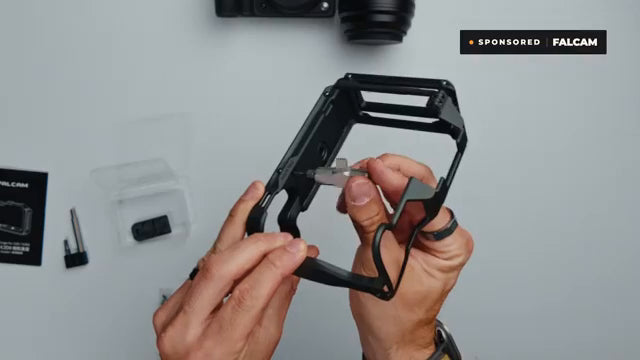
The FALCAM camera cage for Hasselblad X2D / X2D II follows the body's outline. Its 6061 aluminum frame has a hard-anodized finish, with silicone padding at the camera interface. The aim is a fitted protective structure that preserves the original camera's appearance and usable grip.

Raised screen guard rails create clearance when the camera is placed screen-down. The lay-flat design supports use with XCD28, XCD38 and XCD55 lenses. These details are useful when setting the camera down between shots: protection depends on where the assembled body and lens contact the surface, not simply on having metal around the camera.
Buttons, ports and battery access remain available with the cage installed, with a slide-open cover for card and shutter-cable access. The X2D II has a two-way tilting touchscreen; check its movement with the cage and your normal cables fitted. A protective rail is useful only if you can still reach the controls and viewing positions you need.
Move from handheld to tripod with fewer parts
The integrated Arca-compatible base addresses a familiar interruption: reaching a viewpoint, deciding to use the tripod and discovering that the separate plate is somewhere else. With this cage fitted, the mounting surface is already on the camera. Reader demonstrates the handheld-to-tripod change as a main reason the cage is useful for his landscape photography.
The removable L-plate adds a vertical mounting surface. You can remount the camera for portrait compositions rather than relying only on the tripod head's sideways movement. For a session that alternates wide landscapes and vertical framing, this gives the bracket a clear job in the setup.

Whether an L-bracket suits your shooting style depends on how often you make that switch. Leave it fitted for repeated orientation changes; remove it for compact handheld use when the extra mounting surface serves no purpose. Its extension adjusts with a thumbscrew, and a dedicated holder stores the L-plate screw.
Before taking the setup into the field, support the camera while checking both mounting orientations with your actual head. Confirm that the clamp closes securely and the bracket clears connected cables. Arca compatibility describes the intended interface; a successful test of your camera, cage and clamp establishes whether your assembled setup works as intended.
Choose strap attachment points around your workflow
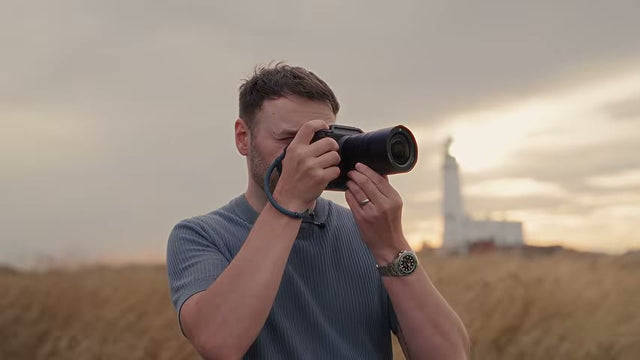
Reader describes avoiding the small metal adapters he normally uses on his X2D. The cage provides five strap lugs for straps up to 13mm wide, creating dedicated attachment locations for wrist, neck or shoulder carry. Choose the connection around the way you carry the camera rather than using every available mounting point.
Try the hanging position with the lens you normally use. Check that the connector seats correctly, leaves the shutter and dials reachable, and stays clear when the camera goes onto the tripod. A comfortable carrying position should also work during the transition to supported shooting.
Strap and tripod quick releases solve different problems: one disconnects the carrying strap, while the other changes the connection to support gear. The cage's strap lugs provide attachment locations; its Arca-compatible base handles tripod mounting. Treat those as separate functions when planning your setup.
Use the hidden AirTag compartment deliberately
The underside contains a concealed AirTag-compatible compartment with a Y-type security screw. It gives the tracker a dedicated home on the camera setup instead of leaving it loose in a bag. The AirTag is purchased separately, and its tracking functions come from Apple's Find My system.

Add the AirTag to Find My before closing the compartment, following Apple's setup instructions for your device and tracker generation. Give it a recognizable name and confirm that it appears in the app. Keep the supplied removal tool somewhere you can find it when the compartment needs to be opened again.
You can also enable Notify When Left Behind in Find My. Apple's instructions cover separation alerts, trusted locations and the need to allow Find My notifications. This is a separate preparation step from fitting the tracker. A hidden slot and security screw do not guarantee that a lost or stolen camera will be recovered.
Compare the two shooting configurations
The cage adds physical mass even when its fitted shape looks unobtrusive. The two configurations have different weights, so compare the arrangement you will actually carry. The dimensions are approximately 151.3 x 69.1 x 116mm; leave room for your lens, strap and bag dividers when checking packing space.
| Configuration | Approximate weight | Practical choice |
|---|---|---|
| Rail cover fitted, L-plate removed | 174g | Handheld sessions without a vertical mounting surface |
| L-plate fitted, rail cover removed | 201g | Tripod sessions with horizontal and vertical compositions |
The cage and L-plate base carry center alignment marks, and a plane mark on the cage's left shoulder provides a distance reference for shift and adapter lenses. These marks offer reference points when positioning the setup; their usefulness depends on your lens and photographic method.
Before the first outing, run through a camera cage fit checklist with the complete assembly. Operate the controls, move the screen, access the battery and card area, and try the mounting change. This short check helps you choose a configuration you can leave fitted throughout the session.
After use, follow sensible camera cage storage practices: remove dirt, let damp equipment dry and keep detached screws and the L-plate together. For an X2D owner who regularly combines strap carry, handheld work and tripod compositions, those integrated features make the clearest case for leaving the cage installed.
Questions about the FALCAM Hasselblad cage
Does this cage fit both the X2D and X2D II?
Yes. C00B5901 fits both the Hasselblad X2D and X2D II. Match the exact model when ordering, then verify access with your normal lens, cables and support equipment.
Do I need to keep the L-plate attached?
No. The removable L-plate provides a vertical tripod mounting option, while removing it gives a more compact handheld configuration. Keep it fitted when frequent orientation changes are part of the session.
Is an AirTag included with the cage?
No. The compartment accepts a separately purchased AirTag. Pair the tracker with Find My before securing it inside, and retain the removal tool for later access.
Does the cage replace careful handling?
No. The frame and raised rails add protection around exposed areas, but they do not establish a drop rating. Keep supporting the camera during mounting and check the complete setup before carrying it.