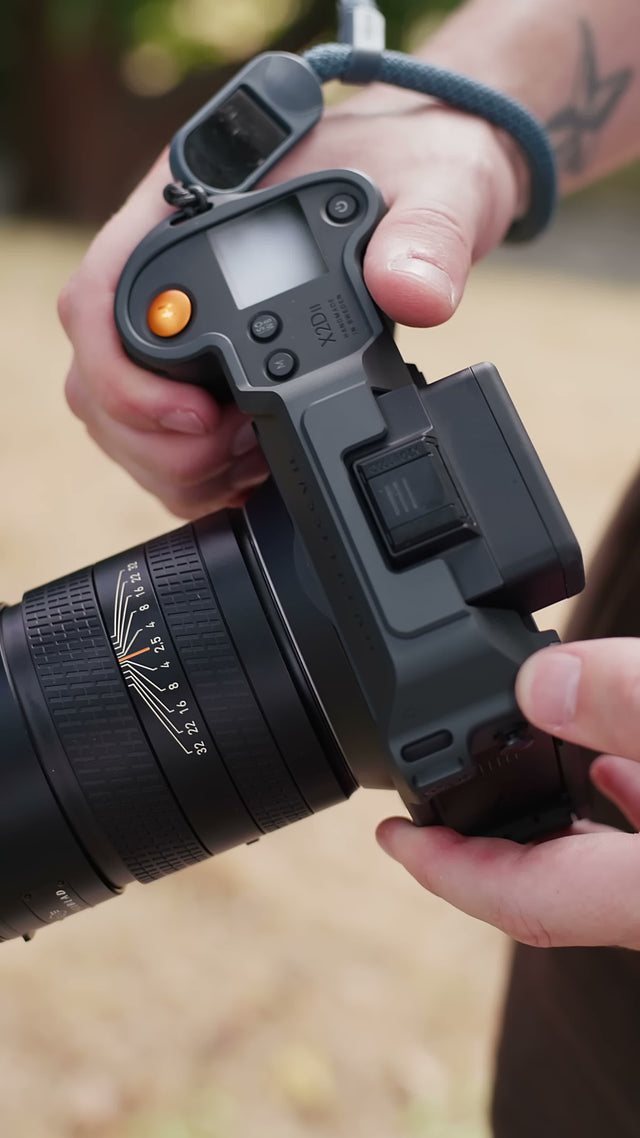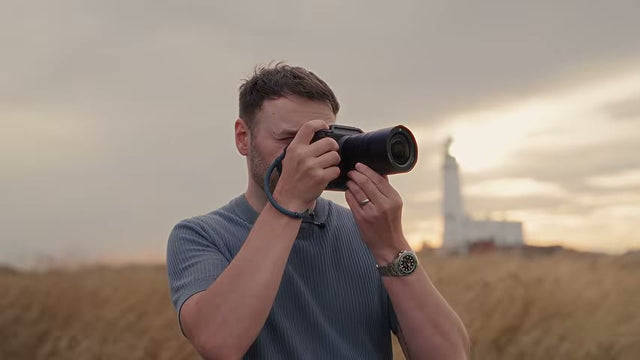


The FALCAM cage for Hasselblad X2D and X2D II brings a fitted protective frame, horizontal and vertical tripod mounting, an AirTag compartment, and additional strap connections into one camera setup. Its value is practical: you can choose a compact handheld configuration or keep the removable L-plate fitted for tripod work, while preserving access to the controls you use throughout a shoot.
For an owner who likes the Hasselblad's original shape, the question is how much useful function a cage can add without making the camera feel unnecessarily complicated. The C00B5901 approaches that question with a grey aluminum frame shaped for the X2D series. Here is how its main features fit together, which configuration suits different shooting routines, and what to check before heading out.
A Fitted Cage That Keeps the Camera Familiar
The FALCAM C00B5901 camera cage is specified for the Hasselblad X2D and X2D II. That model-specific fit matters because a cage must accommodate more than the camera's outline. It also has to leave room for fingers, moving doors, the rear display, and the connections you actually use. Start with the exact camera model when checking compatibility, even if another body looks similar.
Dunna Did It's X2D II setup offers a useful example of the intended result. In the cage segment, he describes the frame as slim, with a color that closely matches the camera, and says it feels unobtrusive in use. For your own choice, look at the frame around the grip and controls as well as the overall appearance.

A close-fitting frame is most useful when it can remain part of the camera's everyday configuration. Think about the sequence you repeat: take the camera out, adjust settings, compose, review, then put it away. If you prefer a simple handheld kit, assess the cage in its configuration without the L-plate. If tripod work is frequent, include the side plate in that assessment from the beginning.
A camera cage fit checklist is helpful when you already have cables or a particular carrying arrangement. Evaluate the complete configuration, including anything that sits beside a door or around the grip. A clear view of an empty port does not tell you how much room your actual connector will need after it is plugged in.
Protection for Everyday Handling and Placement
The cage uses 6061 aluminum alloy with a hard-anodized finish. Ulanzi also specifies silicone padding at the camera-contact areas. The frame and padding have different jobs: the outer structure surrounds the body, while the padded contact surfaces sit between the cage and the camera. Keep those surfaces clean during fitting so loose grit does not become trapped at a contact point.
Raised screen guard rails create clearance when the camera is placed screen-down. This is useful during an ordinary pause to change equipment or rearrange a bag, when the rear of the camera might otherwise rest close to a surface. Check the surface itself first; the rails provide separation, but a protruding object can still reach a recessed area.

The lay-flat design also addresses how the camera rests with a lens attached. Ulanzi specifically illustrates and names support for XCD 28, 38, and 55 lenses. With another lens or a different configuration, check how the assembled camera rests instead of assuming the same contact points and balance.
For daily use, the benefit is a more deliberate set of surfaces around the camera. Treat it as protection against routine contact and placement, with the camera still requiring careful handling. The product information does not establish a drop-test rating, so choosing the cage should not change how securely you carry the camera or where you leave it between shots.
Horizontal and Vertical Mounting with the L-Plate
The removable L-plate provides an Arca-style mounting surface on the side, alongside the integrated mounting arrangement beneath the camera. In practical terms, you can mount the camera horizontally from the bottom or vertically from the side. The video specifically identifies this bottom-and-side arrangement as a reason the cage makes changing orientation convenient.
This is particularly useful when a shoot includes both landscape and portrait compositions. For example, you might photograph a wide view, then make a vertical frame of a doorway or a person in the same setting. An L-bracket for horizontal and vertical shooting gives you a choice of mounting face while keeping the cage attached to the body.
Switching orientation still requires a controlled remount. Support the camera before loosening the clamp, release the current mounting face, then seat the other face fully and close the clamp. Check that it is secure before letting go. The useful distinction is where the camera connects to the head; there is no need to treat the change as an automatic movement.
The side plate uses a thumbscrew for adjustment, and the modular design allows its removal for a more compact handheld configuration. Adjust the extension with the equipment you intend to use in place. A connected cable, an open cover, and your hand may need more room than the bare camera. Once adjusted, verify access and seating again in the orientation you plan to shoot.

Arca-style mounting is a starting point for a compatibility check, not a promise that every clamp will behave identically. Before relying on an existing tripod head, check the actual engagement, clearance, and locking action with the cage. That first check is best done while you can support the camera comfortably, rather than while setting up quickly at a location. Deciding whether you need an L-bracket starts with how often you change orientation on a tripod.
An AirTag Compartment Built into the Frame
A hidden compartment provides a place for an AirTag within the cage. The product also uses a Y-type security screw and supplies the corresponding tool. This integrates the tag into the camera's fitted frame instead of leaving you to find a separate attachment point. The AirTag itself is not included, so factor in a compatible tag if tracking is part of your intended setup.

Pair the AirTag before closing the compartment. Apple's instructions for adding an AirTag to Find My explain how to connect it to an Apple Account. Giving it a recognizable name also makes it easier to select the right item when you have several tags. Confirm that the tag appears in your app before fitting it into the cage.
Before a trip, check that the tag appears under the intended Apple Account and that the Find My settings on your device are ready to use. The tracking functions depend on the tag, device, and service conditions; availability and features can vary by region.
If the tagged camera is misplaced, locating an AirTag with Find My can include a map location and nearby finding or sound options where supported. Try the available controls before you need them. A short check at home is more useful than discovering during a trip that the item has not been set up as expected.
The hidden location and security screw add practical integration, but they do not guarantee theft prevention or recovery. Keep the removal tool somewhere you can find it for servicing. The most useful role for the compartment is an additional tracking option that stays associated with the camera, alongside the normal care you take with your equipment.
Access to Controls, Cards, and the Battery
A cage that needs to be removed for routine tasks can become inconvenient quickly. The C00B5901 is designed to leave the buttons, ports, and battery accessible, with a sliding cover arrangement for shutter-cable and card access. This makes everyday operation an important part of the fit, rather than something to check only after installing the frame.

After fitting the cage, work through the controls in the way you normally shoot. The X2D II's two-way tilting screen can also be pulled outward to clear the viewfinder. Check the screen through the positions you use for framing, then reach the buttons and joystick, open the battery door, and check the card access. Repeat the relevant checks with the L-plate fitted if you plan to keep it on. A configuration that works well handheld should also be checked when clamped to your tripod.
If you use a shutter cable, connect that actual cable during the check. Look at the plug as well as the wire: connector housings can occupy space beside the camera, and a cable needs a sensible route after it leaves the port. Arrange it so it does not cross a control you need to reach or interfere with changing orientation.
There are also center marks on the L-plate and baseplate, plus a sensor-plane reference on the cage's left shoulder. These provide visible alignment references for a considered setup. Use them as reference marks while composing or positioning equipment; they do not replace checking the frame, horizon, or the camera's final orientation yourself.
Strap Connections for Everyday Carry
The cage adds five strap lugs, giving you more choices for where a shoulder or wrist strap connects. Ulanzi specifies 13mm openings for straps 13mm wide or narrower. The video highlights this addition because it allows the creator to use a regular strap rather than relying only on the original Hasselblad strap arrangement.

Width is one part of fit. Check how the actual strap or connector threads through the opening, where its hardware rests, and whether it can move against the camera. Choose the connection positions according to how you carry and lift the assembled kit. Your lens and preferred grip will affect which arrangement feels comfortable.
Before using the camera on a tripod, move loose strap sections away from the clamp and controls. When taking it back into your hands, make sure the strap has not become caught around the side plate. These small routing checks help the cage's carrying and mounting features work together throughout a shoot, rather than treating them as separate setups.
The extra lugs are most valuable if the camera's original attachment arrangement does not suit your routine. You do not need to use every connection point. Start with the simplest arrangement that supports your preferred carry, then check that you can still reach the grip, open the relevant doors, and mount the camera in both orientations you intend to use.
Choose the Configuration You Will Actually Carry
There are two useful ways to think about the modular design. Keep the L-plate fitted when side mounting is part of your normal tripod work. Remove it when a compact handheld setup matters more and you do not need that side mounting face. The point is to choose around the next shoot, while keeping the same fitted cage as the basis of the setup.
Ulanzi lists approximately 174g with the rail cover and without the L-plate, or approximately 201g with the L-plate and without the rail cover. Those figures describe different configurations. Use the matching figure when estimating your kit weight; subtracting them does not establish the L-plate's standalone weight because the rail-cover condition also changes.
| Detail | Official specification | What to check |
|---|---|---|
| Compatible bodies | Hasselblad X2D / X2D II | Exact body model |
| Main material | 6061 aluminum alloy | Clean contact surfaces when fitting |
| Dimensions | Approximately 151.3 × 69.1 × 116mm | Space in your existing bag |
| Without L-plate | Approximately 174g, with rail cover | Handheld configuration |
| With L-plate | Approximately 201g, without rail cover | Side-mounting requirement |
| Strap width | 13mm or narrower | Actual strap and connector fit |
Measure the available space in your bag with the camera configured as you intend to carry it. A side plate and an attached strap can change how the kit passes through an opening or sits between dividers. Checking this with your usual lens attached gives you a more useful answer than assessing the cage alone.
Camera cage storage practices also matter between shoots. Clear away loose dirt before packing, give the assembled kit adequate space, and keep detached parts organized. Store the special removal tool where it will remain available. A modular feature is easier to use when the parts needed to change configuration are ready when you need them.
For a day that begins with handheld street photography and ends with tripod compositions, decide when you expect to use the side plate. You might keep it fitted throughout, or pack it separately and fit it before the tripod session. Make that choice while preparing the bag, then try the relevant adjustment at home. This gives you a useful rehearsal of the configuration change without requiring the same setup for every part of the day.
Common Questions About the FALCAM X2D Cage
Does the same cage fit the X2D and X2D II?
Yes. The C00B5901 listing specifies both Hasselblad X2D and X2D II. Match that exact model designation when ordering. After installation, use a camera cage fit checklist to check your lens, strap, cables, and intended tripod configuration, so the named body compatibility translates into practical access for your equipment.
Is an AirTag included with the cage?
No. The cage includes the compartment, while the AirTag is purchased separately. Pair the tag and confirm that it appears in Find My before closing it into the frame. This makes the compartment useful as part of a prepared tracking setup rather than simply as unused storage space.
Can the L-plate be removed for handheld photography?
Yes. The modular L-plate can be removed, and its adjustment uses a thumbscrew. That gives you a more compact configuration when you do not need side mounting. Keep it fitted when frequent portrait-orientation tripod work is more important than reducing the side profile of the camera.
Will the cage fit every Arca-style tripod clamp?
Check your clamp. The cage provides Arca-style mounting, but the complete setup still needs a physical fit check. Confirm seating, clearance, and locking action with your head before a shoot. Support the camera throughout mounting and remounting until you have verified that the clamp is securely closed.
Can I change the battery and access the card with it fitted?
Yes. The cage is designed to preserve those routine access points, including a sliding cover arrangement for the card and shutter-cable area. Check the same tasks with your selected L-plate position and any connected cable. Accessories beside an opening can affect the space available to your hands.
How much weight does the cage add?
It depends on the configuration. The listed weights are about 174g with the rail cover and without the L-plate, or 201g with the L-plate and without the rail cover. Choose the configuration you expect to use, then include its stated weight when planning the camera, lens, and bag combination.
A Practical Addition to Your Hasselblad Setup
The C00B5901 is most relevant when you want the protective frame to do several everyday jobs: provide placement clearance, keep an AirTag compartment associated with the body, add carrying connections, and make bottom or side tripod mounting available. Its removable L-plate lets you give priority to either a compact handheld configuration or frequent changes of orientation.
Choose it around those tasks. Check the fitted camera in your hands, in your bag, and on your tripod, with the equipment you actually use. When those details align, the cage becomes a practical part of the X2D or X2D II setup you take out to photograph.