Buy the gear change that fixes the snag you keep hitting in real work, not the item with the biggest discount badge. That fix might be an accessory that cuts setup time, a replacement for core gear that has hit its limit, or no purchase at all.

The order is simple. Name the repeat problem, figure out whether an add-on or your core gear causes it, then run the candidate through fit, budget, and price checks before you check out.
Choose the Upgrade That Removes Your Most Disruptive Repeat Snag
Your first upgrade candidate comes from your own recent shoots, not from a deal list. Work through these steps before you open a single sale page.
- Review your last several shoots or recording sessions. Look for friction you can actually point to: setup that ran long, a workaround you rigged, a retake, or a shot you couldn't get the way you planned it.
- Write down the task each snag disrupted and when it happened. "Re-leveling the phone for every overhead product shot" gives you something to fix. "My setup feels slow" does not.
- Note where the snag occurs in your production workflow. Creator video work can be split into pre-production, production, post-production, and distribution or repurposing. If you film without trouble but stall when turning a long video into short clips, that is a workflow problem, not a shooting problem, and new camera gear won't solve it.
- Rank what's left by how often it shows up and how much it costs you. Count the lost time, the retakes, and the shots you skipped. The snag that repeats and does real damage to your output goes to the top.
You should end up with a short list of real snags and one clear priority. If no pattern shows up, that's a useful result too: it means no purchase has earned the top spot yet.
If your snags show up during phone product shoots, our phone video workflow guide breaks that process into support, lighting, reflection control, close-ups, audio, and a final check. That makes it easier to see which step keeps failing.
Keep discounts out of this step entirely. A bigger markdown on an unrelated item doesn't move it ahead of the snag at the top of your list.
Decide Whether the Fix Is an Accessory or Core Gear
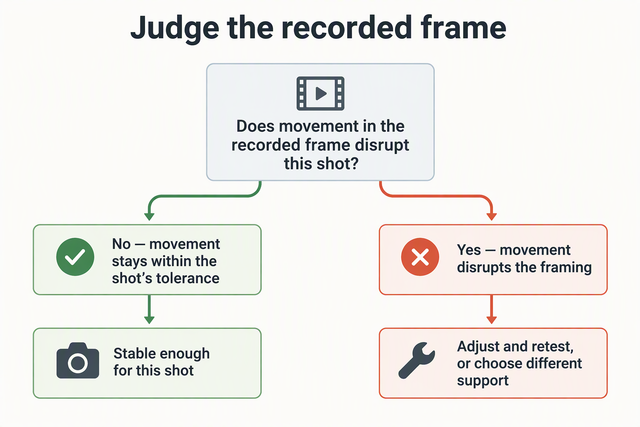
Choose an accessory when your camera, phone, or mic can already do the job but something around it is missing. Choose core gear when the limit sits inside the device itself and no add-on would change the result. To tell which one you're dealing with, trace the snag back to the exact step that fails or needs a workaround.
| What you observe (illustrative) | Upgrade type to consider |
|---|---|
| Footage is fine once framed, but support is rebuilt every session | Accessory: support or mounting |
| Swapping between tripod, gimbal, and handheld eats setup time | Accessory: quick-release mounting |
| Device records well, but light spills or shadows look harsh | Accessory: light shaping and control |
| Task still fails with good support, light, and setup | Core gear: camera, phone, or mic |
Run one test on your top snag: if the missing piece showed up tomorrow, would the task work with the gear you already own? If yes, an accessory is a real candidate. If no, a cheaper add-on just leaves the original snag in place and adds weight to your bag.

When the answer points to support, our vlog tripods are the place to start comparing. Harsh or spilling light points toward lighting control gear such as softboxes and barndoors. If the delay comes from changing mounts, a quick release system targets that changeover. To match other missing functions to an accessory type, our vlogging camera and smartphone accessories roundup groups options for beginners and pros.
Pass the Fit, Budget, and Deal Checks Before Buying
Buy only when the candidate fits your exact setup, stays under your spending limit, and the live listing terms hold up. If it fails any one of these gates, pass.
- Confirm fit with your exact gear. Match the candidate against your device model, mount or connection type, power needs such as battery, USB, or wall power, and the task you named earlier. For quick-release plates, our F38 compatibility guide shows the kind of head, gimbal, and clamp checks to make. If the listing or the manufacturer's specs can't confirm a match, treat it as a no.
- Set your spending limit before you look at deals. Write the number down. If the candidate costs more, either pass or wait for a better price on that same item.
- Check the live listing, not the badge. Amazon product pages have a "Price history" button that shows historical pricing for 30, 90, and 365 days, so you can see whether a discount is real or follows a recent price hike. If the price isn't right yet, you can set a price alert and come back to it. Read the seller, return window, and warranty terms too. If a candidate from our lineup made your list, check its current terms on our Prime event deals page when you're ready to decide.
- Ask the priority question one last time. Does this item still fix the snag at the top of your list? If yes and every gate above passed, buy it. If not, close the tab.
If nothing passes, keep logging snags on your next few shoots. You'll go into the next sale with a clearer list and a purchase that earns its spot.
FAQs
What if two upgrades seem equally urgent?
Use your next relevant shoot as the tiebreaker. Note which snag actually hurt the finished result, such as a retake or a lost shot, versus one that only added a few minutes. Buy the fix for the snag that damaged the output. If they still look even, choose the candidate that passes the fit checks more cleanly with your current gear.
Should a snag that only happens sometimes count?
Yes, if you can tie it to a specific type of shoot. A problem that shows up on every product video still matters even if your other content runs smoothly. If you can't connect it to any pattern, keep a note of it and let it compete with your other creator gear upgrades once you have more sessions logged.
What if no gear clearly fixes my repeat problem?
Then don't buy anything yet. The cause may be a process, editing, or scheduling issue rather than equipment. Keep recording what goes wrong and when, and wait until a candidate clearly connects to the task that keeps breaking.
Is a deep discount on a new camera or phone a reason to replace mine early?
Only if your current device is the cause of your top snag. A markdown doesn't change what your existing gear can do. If your camera or phone already handles the task once support and light are sorted, the savings on a replacement still spend money that won't fix your workflow.